


Overview
In my previous parts of my Azure App Service series, I covered what Azure App Service is, certificates and security, Microsoft Defender for Cloud, and monitoring and performance optimization.
For this blog, I would want to touch something that comes up quite often when designing production environments: How do we make sure an Azure App Service can handle increasing traffic while remaining available?
This is where scaling and high availability come into the picture.
One thing I've learned from working with Azure environments is that deploying an application successfully doesn't necessarily mean it's ready for production.. Few Scenarios are:
- Your application might work perfectly with 100 users. But what happens when that becomes 1,000 users? Or 10,000?
- What happens if there is a sudden spike in traffic?
- And perhaps more importantly, what happens if one of your App Service instances becomes unhealthy?
These are the kinds of questions we need to think about when designing applications for production.
Understand the Chosen SKU
Before talking about scaling, it's important to understand one basic concept.
Simply, your Web App runs on an App Service Plan.
The App Service Plan determines the underlying compute resources available to your applications, including CPU, memory, instance capabilities, and supported scaling features. This is why choosing the correct App Service Plan is an architecture decision rather than simply a pricing decision.
When I look at an App Service environment, I normally consider things like:
- Expected number of users
- Application architecture
- CPU and memory requirements
- Traffic patterns
- Business-criticality
- Availability requirements
- Scaling requirements
- Budget
There isn't one App Service Plan that is suitable for every application.
Key Difference for Scale Up vs Scale Out
This is probably the most important concept to understand when discussing Azure App Service scaling. There are two main approaches:
Scale Up – Vertical Scaling
and
Scale Out – Horizontal Scaling
They sound similar, but they solve different problems.
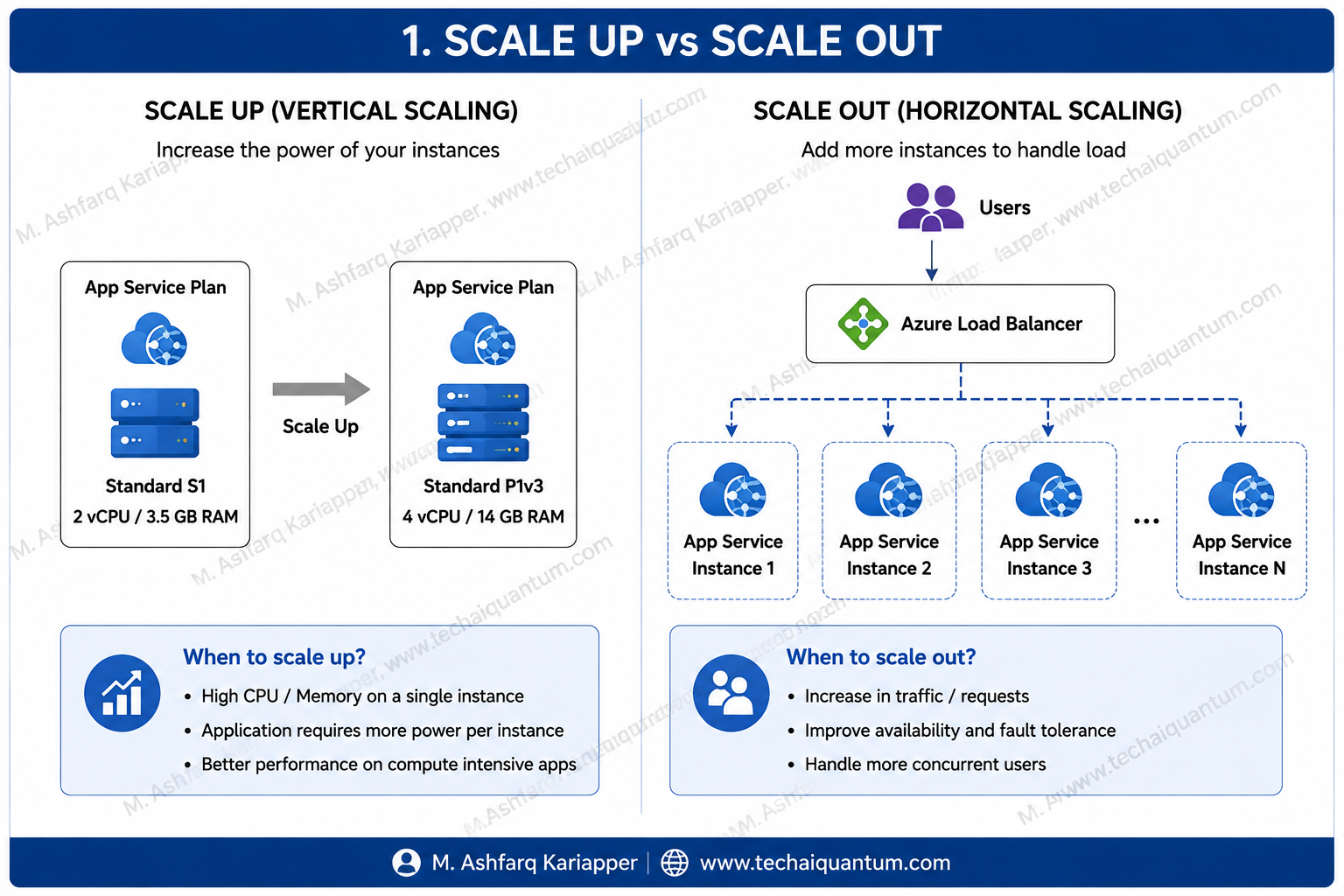
What Is Scale Up?
Scaling up means increasing the resources available to your application by moving to a more capable App Service Plan or SKU. In simple terms:
Instead of adding more servers, you're making the available compute more powerful.
For example:
The exact resources and available tiers depend on the App Service Plan and region, but the concept remains the same.
Scaling up can provide:
- More CPU
- More memory
- Additional platform capabilities
- Higher scaling limits
This can be useful when your application is constrained by the resources available on an individual instance.
When Would I Scale Up?
I normally consider scaling up when I see sustained resource pressure and determine that the application genuinely requires more compute per instance. For example, imagine Application Insights and Azure Monitor show that:
- CPU utilization is consistently high.
- Memory consumption is approaching the limits of the current plan.
- Response times are increasing.
At that point, moving to a more powerful App Service Plan may help. But there is something important to remember.
Scaling up alone doesn't necessarily give you high availability.
You could have a very powerful instance, but if everything depends on that single instance, you still don't have the level of resilience I would normally want for an important production application.
Thats where Scale Out becomes important
What Is Scale Out?
Scaling out means running your application across multiple App Service instances.
Azure distributes incoming requests across the available instances. This gives you two major benefits:
- Performance
- Availability
If traffic increases, multiple instances can process requests simultaneously.
If one instance becomes unhealthy, the application isn't necessarily dependent on that single worker.
For business-critical applications, this is an important design consideration
Thats where Scale Out becomes important
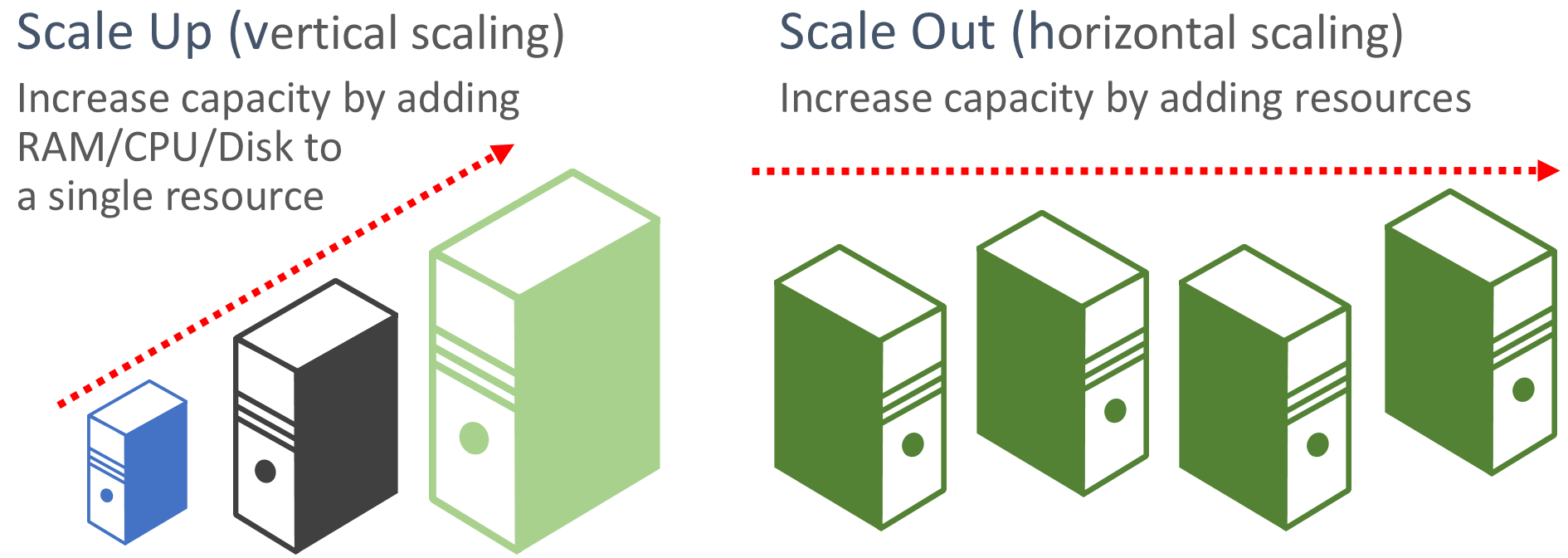
Scale Up vs Scale Out
A simple way I explain this is:
Scale Up = Bigger
Scale Out = More
For example:
Imagine you have a restaurant with one chef. The restaurant becomes busy. You have two choices.
Either you can hire a much faster and more experienced chef.
That's similar to scaling up.
Or you could add two more chefs and distribute the orders between them.
That's similar to scaling out.
In cloud architecture/while building a solution, we often use a combination of both.
Autoscale Makes This More Interesting
Manually increasing the number of instances every time traffic increases isn't practical.
That's why Azure provides Autoscale capabilities.
Depending on your App Service configuration and tier, scaling can be based on schedules, metrics, or automatic scaling capabilities.
For example, you could configure your environment so that additional capacity is introduced when application demand increases.
Conceptually:
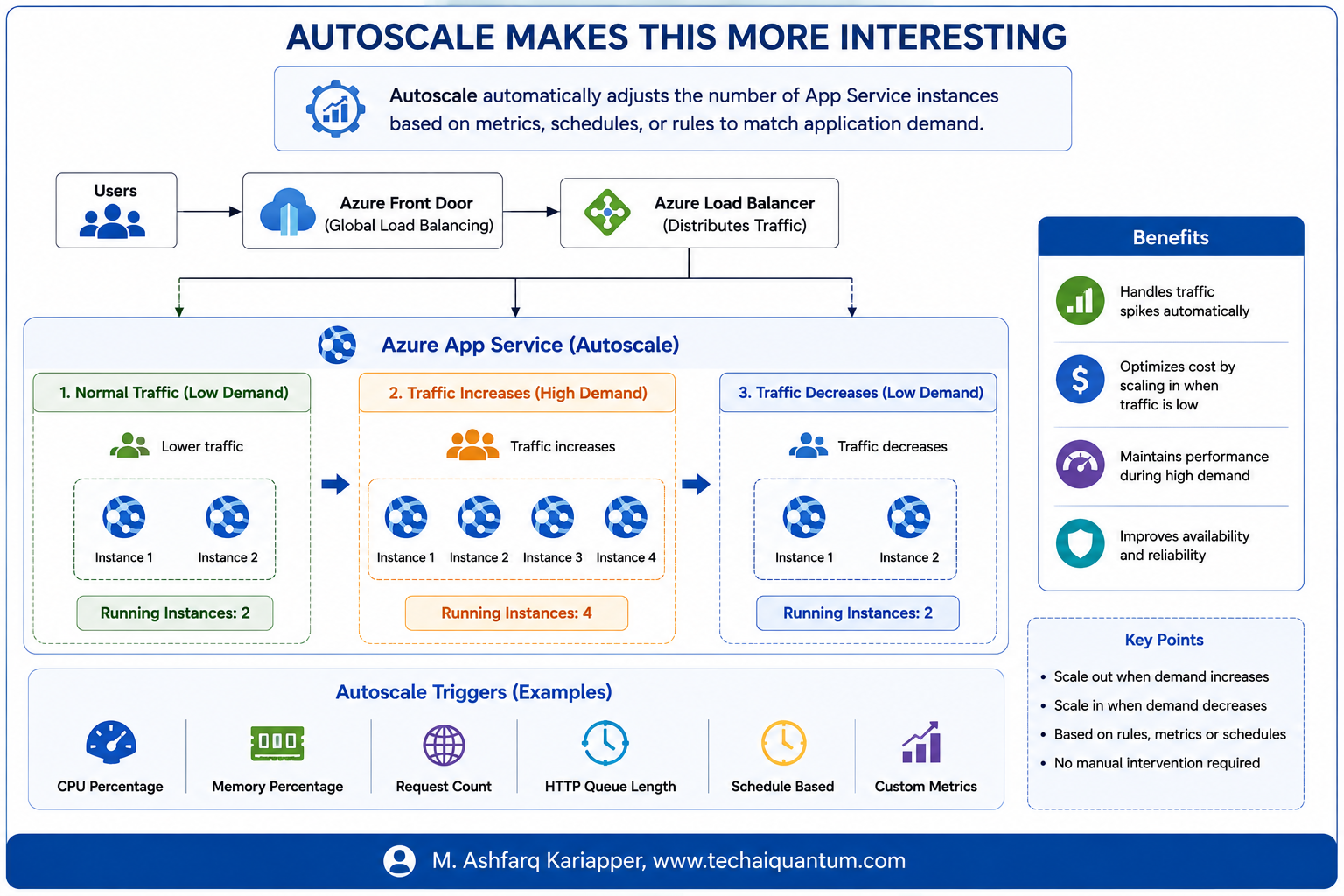
The advantage is that you don't need to permanently run maximum capacity.
You can increase capacity when required and reduce it when demand decreases.
Autoscale Makes This More Interesting
Which Metrics Should We Monitor?
You shouldn't configure scaling rules randomly. Always use monitoring data to understand how your application behaves. Some metrics I usually look at include:
- CPU Percentage
- Memory Percentage
- HTTP Queue Length
- Requests
- Response Time
- Application-specific metrics
- Application Insights on the Application level
For example,
If CPU utilization remains high for a sustained period, you may decide to increase the number of instances. But I normally avoid designing scaling rules that react too aggressively.
Imagine CPU briefly reaches 80% for 30 seconds. That doesn't necessarily mean you need another instance. The application may simply be processing a short burst of requests. Scaling decisions should normally consider sustained demand rather than every temporary spike.
Scale-In Is Just as Important
Everyone talks about scaling out. But scaling in is equally important.
Let's say your application receives heavy traffic between 8 AM and 6 PM. During business hours, you might require four instances. At midnight, perhaps you only need two. Running unnecessary capacity throughout the night increases your Azure cost without providing much benefit. A good scaling strategy therefore needs to think about both:
Performance during peak demand
&
Cost efficiency during low demand.
Be Careful With Minimum Instances
For production applications requiring high availability, I generally don't like relying on a single instance. If the workload and App Service tier support your availability requirements, running multiple instances provides better resilience.
For example:
Production App Service
Minimum Instances: 2
Normal Load: 2
Higher Load: 3–5
The actual number depends entirely on the application and business requirements.
There is no magic number. That's why capacity planning and performance testing are important.
High Availability Is More Than Adding Instances
This is another important point. Sometimes people assume:
"I have three App Service instances, so my application is highly available."
Not necessarily, your application might be distributed across multiple instances, but what about the rest of the architecture?
Think about:
- Database
- Storage
- DNS
- Networking
- Authentication
- External APIs
- Secrets
- Application dependencies
Your application is only as resilient as its dependencies.
For example:
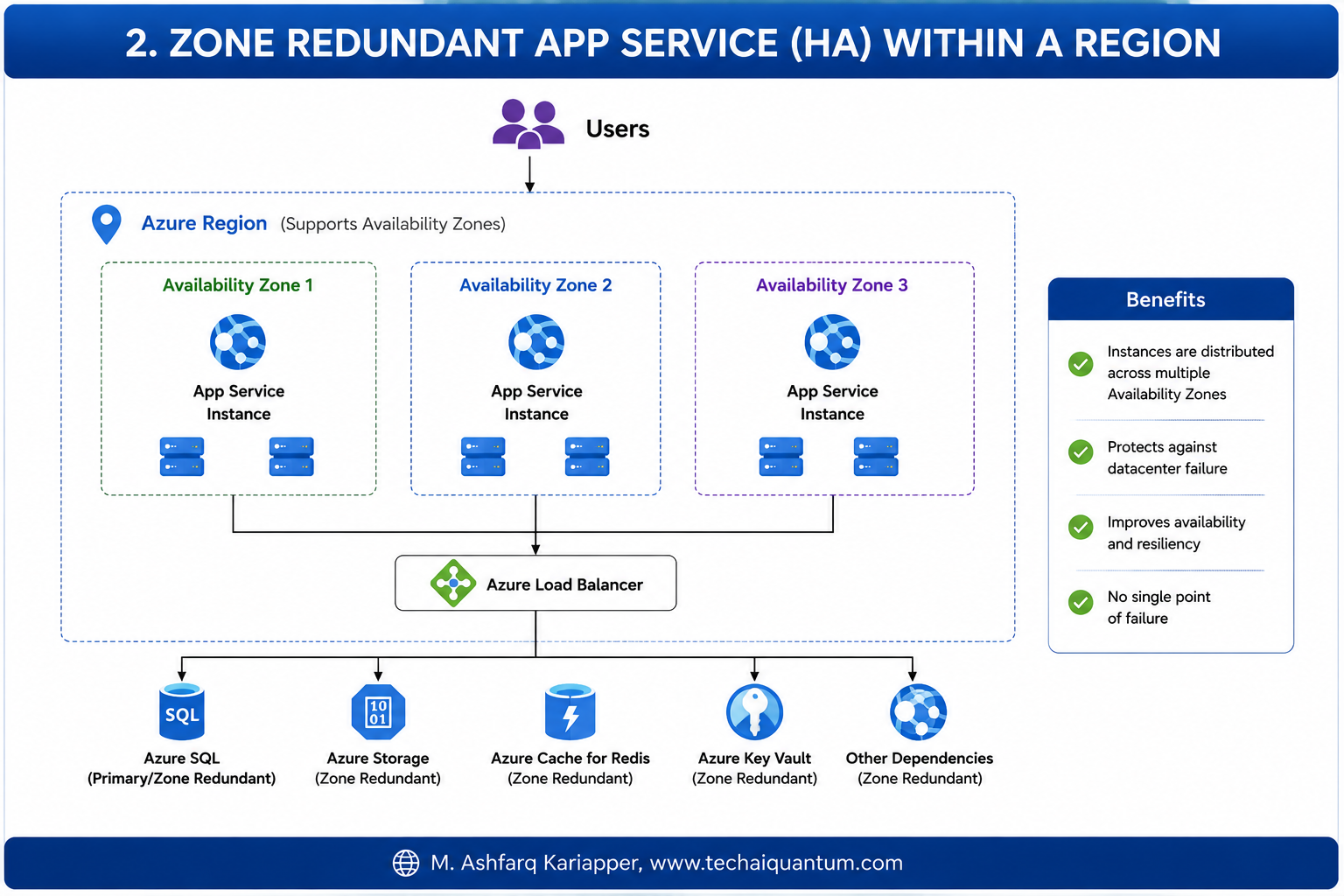
If your App Service is highly available but the backend database becomes unavailable, the application may still fail.
That's why high availability needs to be considered across the entire architecture
What About Availability Zones?
For supported App Service Plans and Azure regions, Availability Zone redundancy can further improve resilience. Instead of relying on infrastructure within a single datacenter location, instances can be distributed across Availability Zones.
This provides additional protection against certain datacenter-level failures.
For business-critical workloads, this is definitely something worth considering when designing the App Service architecture.
What If the Entire Azure Region Has a Problem?
This is where architecture becomes more interesting. Multiple instances and Availability Zones help improve availability within a region. But some applications require protection against a regional outage. For those workloads, we may need to consider a multi-region architecture.
For example:
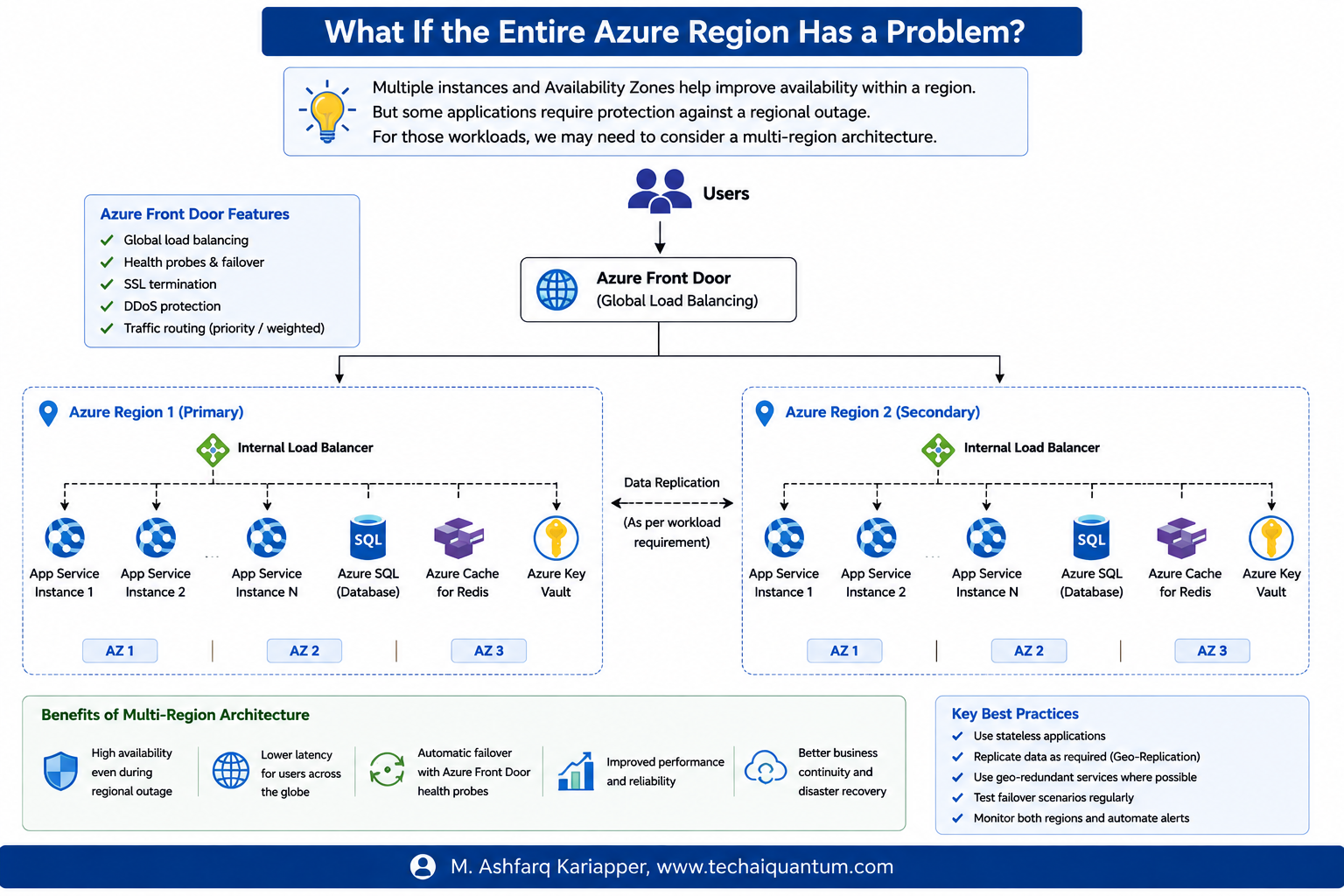
Azure Front Door can provide global routing and direct traffic to healthy application endpoints depending on how the architecture is configured.
However, multi-region architecture introduces additional considerations. Your database needs a regional resilience strategy. Your storage needs to be considered.
Your application needs to handle distributed sessions appropriately. DNS, secrets, networking, deployment processes, and data consistency all become part of the design. So multi-region should be driven by business requirements rather than implemented simply because it sounds more resilient.
Don't Forget Application State
One issue that can appear when scaling out applications is session state.
Imagine a user connects to Instance 1. Their next request may be processed by Instance 2. If important session information exists only in the memory of Instance 1, the user could experience unexpected behaviour.
This is why scalable cloud applications should ideally be designed to be as stateless as possible. Where shared state is required, external services can be used.
For example: Azure Cache for Redis or an appropriate database/storage service.
This allows multiple App Service instances to access shared information rather than depending on local instance memory.
Don't Forget Application State
One practice I strongly recommend is load testing. Don't wait for thousands of real users to discover how your application behaves under pressure.
Test it before production.
Azure Load Testing can help simulate application traffic and show how your environment behaves under load.
During testing, I normally watch:
- CPU
- Memory
- Response time
- Request rate
- Failed requests
- Database performance
- Dependency latency
This helps answer questions like:
- How many users can one instance support?
- When should autoscaling happen?
- Does adding another instance actually improve performance?
- Is App Service really the bottleneck, or is it the database?
These are much better questions to answer before going live.
My Approach for Production App Services
When I'm designing App Service for an important production workload, I generally think through the following areas:
Reach me over for me to go in depth on these areas
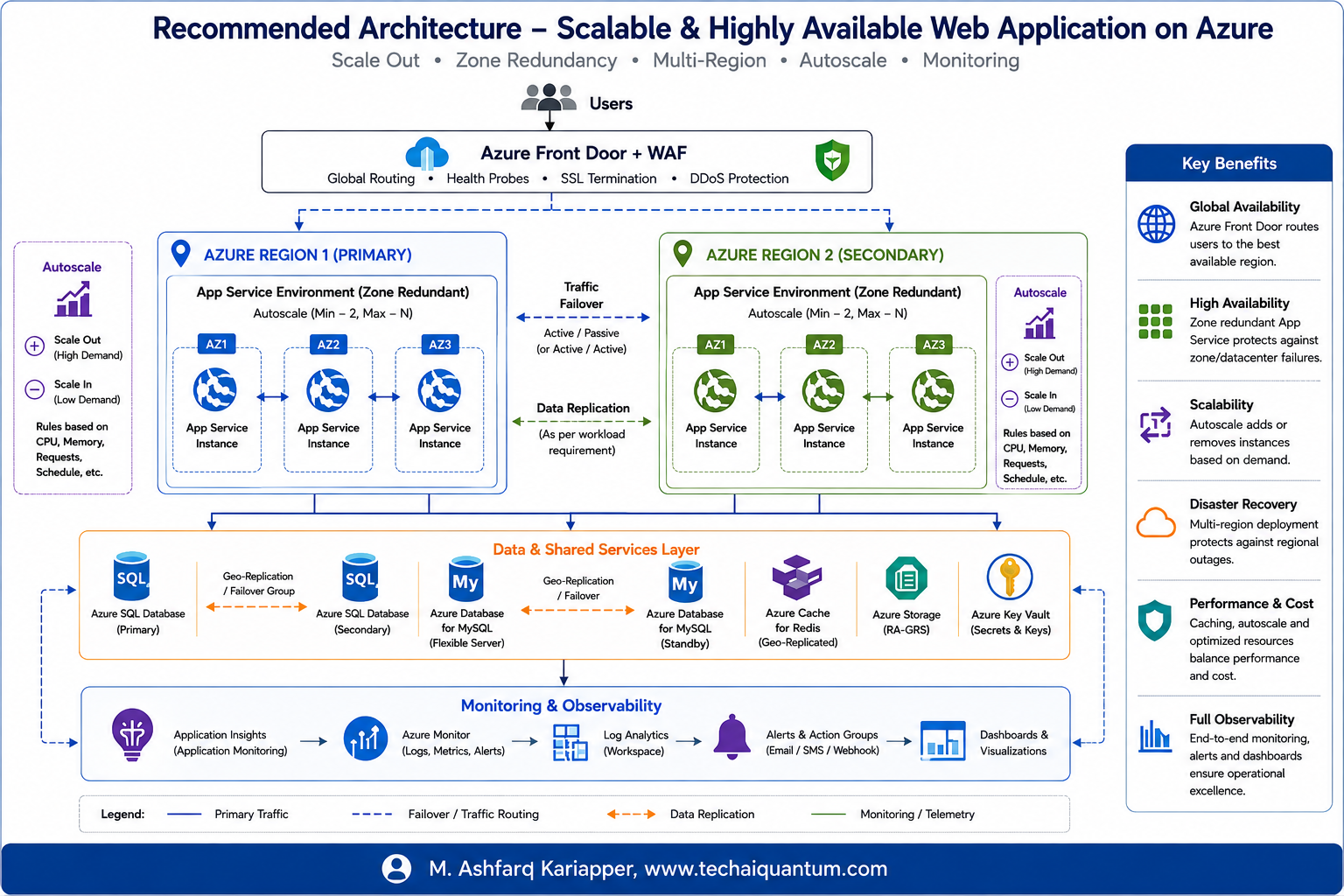
My Approach for Production App Services
One of the biggest advantages of cloud platforms like Azure is elasticity. We no longer need to purchase infrastructure based on what we think the application might need three years from now. We can start with the appropriate capacity and allow the environment to grow as demand changes. But scaling isn't simply about increasing CPU or adding more instances.
A good scaling strategy combines:
Monitoring + Application Design + Autoscaling + High Availability + Cost Optimization.
And perhaps the most important lesson I've learned is this:
Don't wait for a performance problem to start thinking about scaling.
Understand your application's behaviour, monitor it properly, test it under load, and design your scaling strategy before it becomes a production issue.
That's how we move from simply hosting an application in Azure to actually architecting an application for the cloud.
