

Overview
When I started working with Azure App Service, I used to look at availability mainly from the perspective of keeping the application online. Is the App Service running? Are the instances healthy? Is the application responding? Is the database available?
But as I became more involved in designing and supporting production environments, I realised that high availability is only one part of the story.
The more important question is:
What happens when something goes seriously wrong?
- What happens if someone accidentally deletes data?
- What happens if an application deployment corrupts something?
- What happens if the database becomes unavailable?
- What happens if an Azure region has a major outage?
And perhaps the question that is often forgotten:
How quickly can we actually recover?
This is where Backup, Disaster Recovery (DR), and Business Continuity (BC) become extremely important.
In the previous parts of this series, I discussed scaling, high availability, monitoring, deployment slots and CI/CD.
For me, Part 9 is where all of those topics start coming together. Because having a highly available application is great. But if we cannot recover from a major failure, we haven't really completed the resilience story.
Backup Is Not Disaster Recovery
This is probably the first thing I would clarify. I've seen these terms used interchangeably, but they are not the same thing.
- Backup is about being able to recover data or application content from a previous point in time.
- Disaster Recovery is about restoring the application and its dependencies after a major failure.
Business Continuity is broader. It is about keeping the business operating when something goes wrong. A simple way I think about it is:
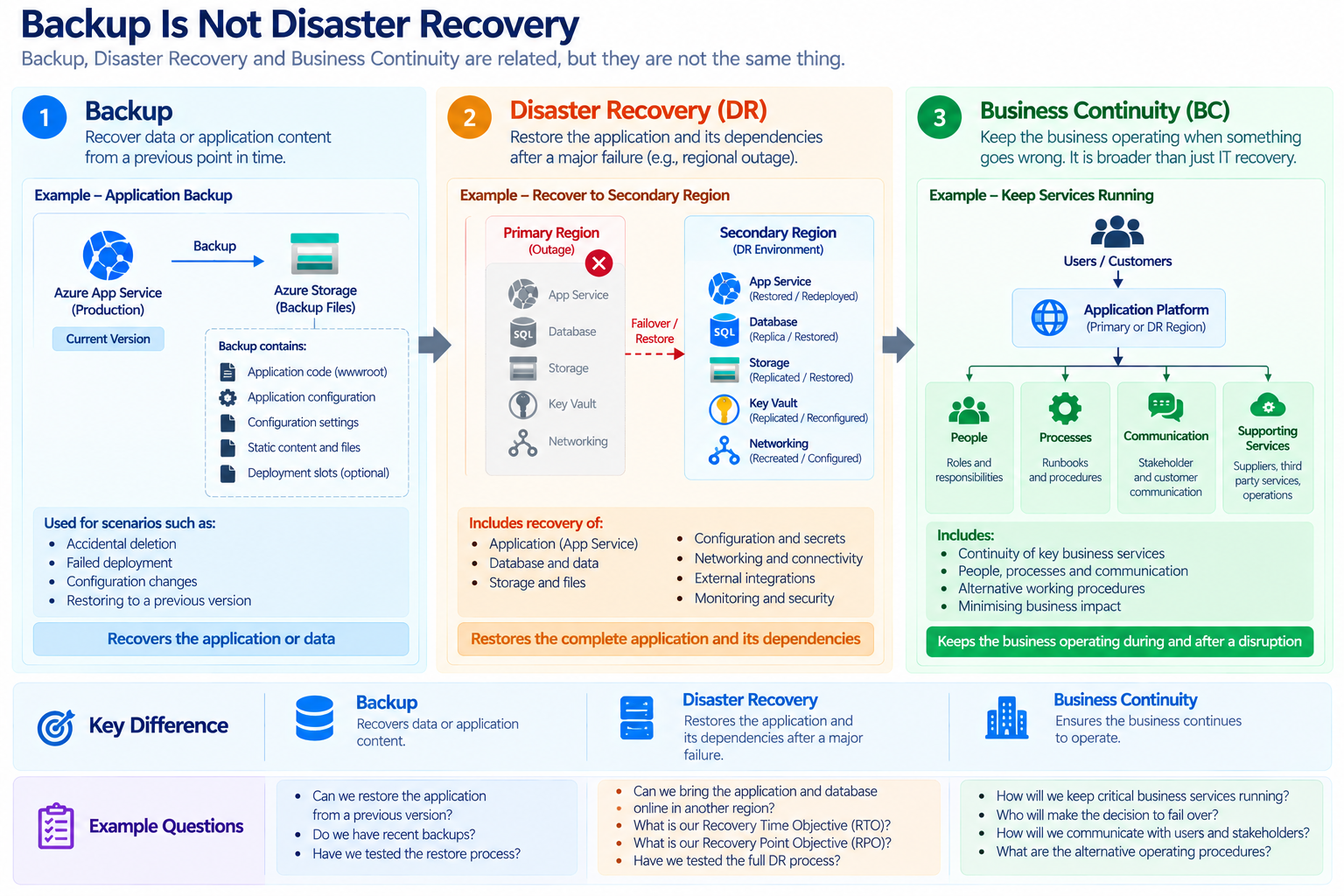
So having a backup does not automatically mean that you have a disaster recovery strategy. And having a disaster recovery environment doesn't automatically mean the business has continuity. There are several pieces that need to work together.
Why App Service Backup Alone Isn't Enough
Azure App Service provides backup and restore capabilities, and these are useful. We can configure backups and restore an application when required. But one lesson I've learned is:
Never assume that an App Service backup by itself is your complete DR strategy.
Microsoft itself recommends that most solutions shouldn't rely exclusively on backups and that other resiliency capabilities should be used according to the application's requirements.
Think about a typical application. It might have
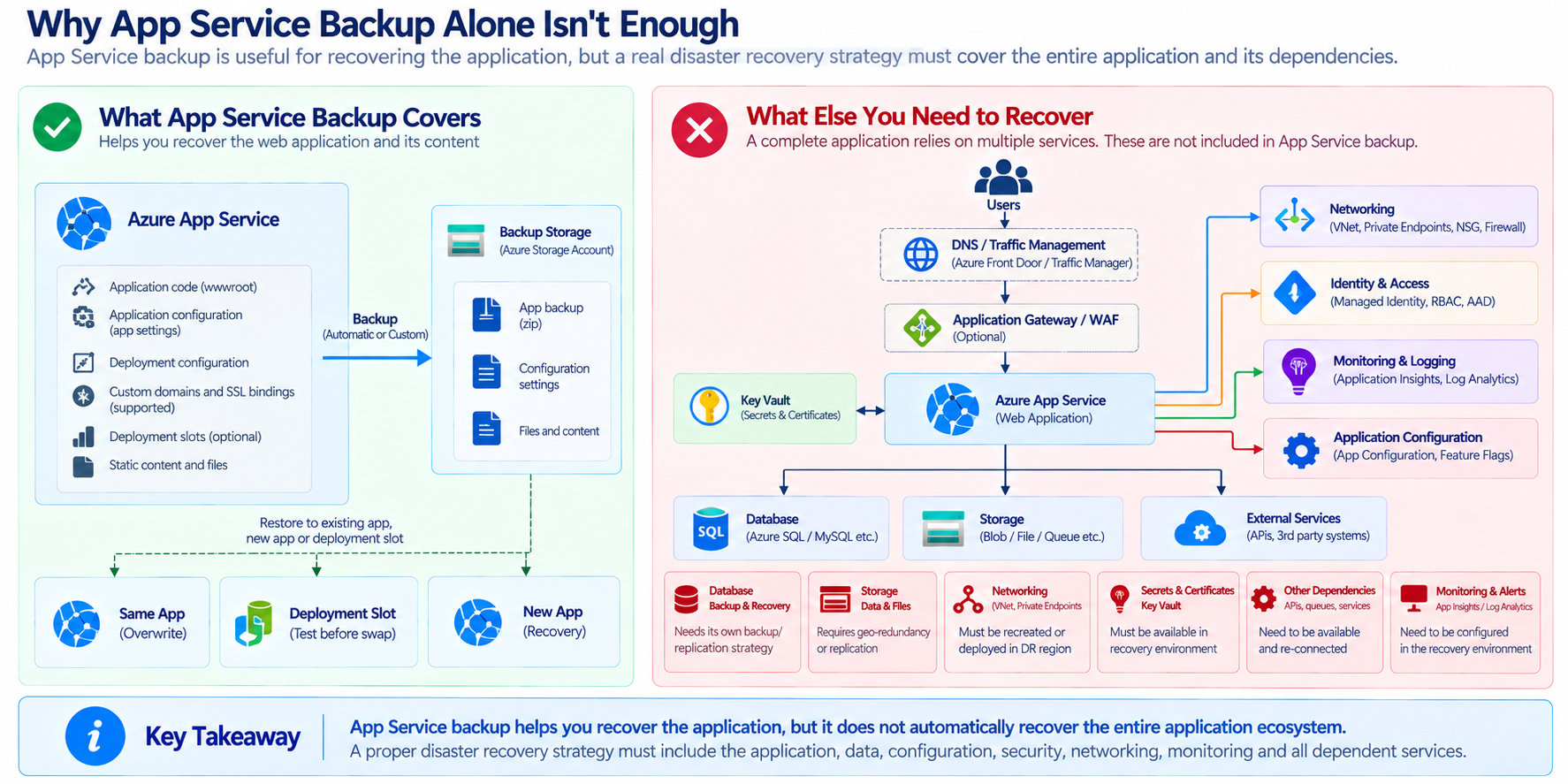
Backing up the App Service doesn't necessarily solve every problem with those dependencies.
For example, restoring the application code is not enough if the database has lost important transactional data.
This is why I prefer looking at the entire application architecture, rather than treating backup as an isolated App Service feature.
What Should We Actually Back Up?
When I design a production environment, I don't just ask:
Do we have an App Service backup?
I ask:
Can we recover everything the application needs to operate?
That normally includes:
- Application - Application Code, App Configuration, Deployment Config, Certificates and Slots
- Data - Database, Files, App Generated Data
- Infrastructure - Service Plan, Networking Config, DNS, Endpoints, Firewall Rules, Application Gateway config
- Security - RBAC, Secrets and Configurations, Managed Identity, Connectivity
- Observability - Alerts, Dashboards, Insights
Not everything needs to be backed up in exactly the same way. Some components can be recreated through Infrastructure as Code. Others need actual data backups. That distinction is important.
The Game Changer - In kicking up the environment!!!
One practice that I increasingly recommend is using Infrastructure as Code (IaC). For example:
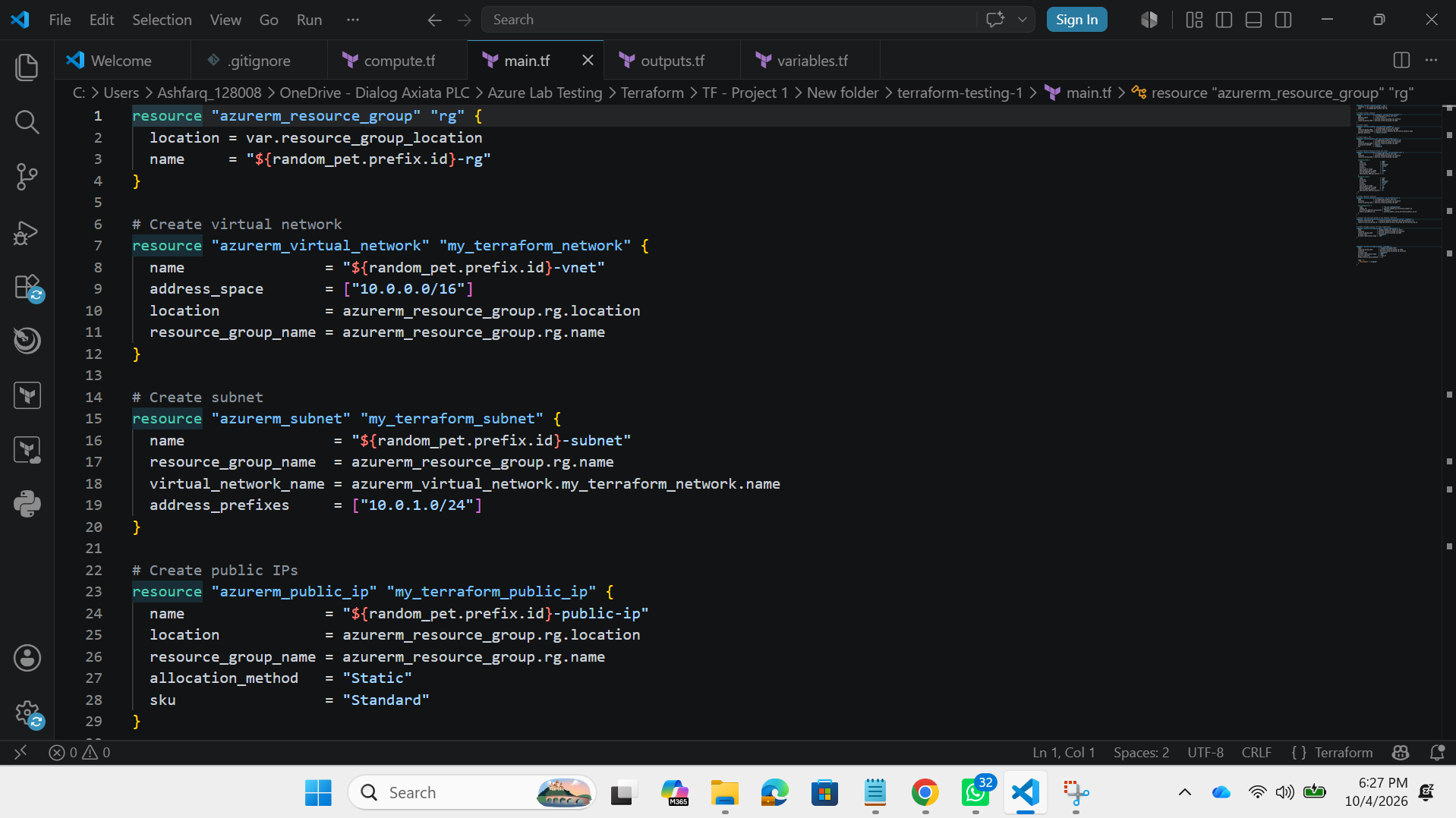
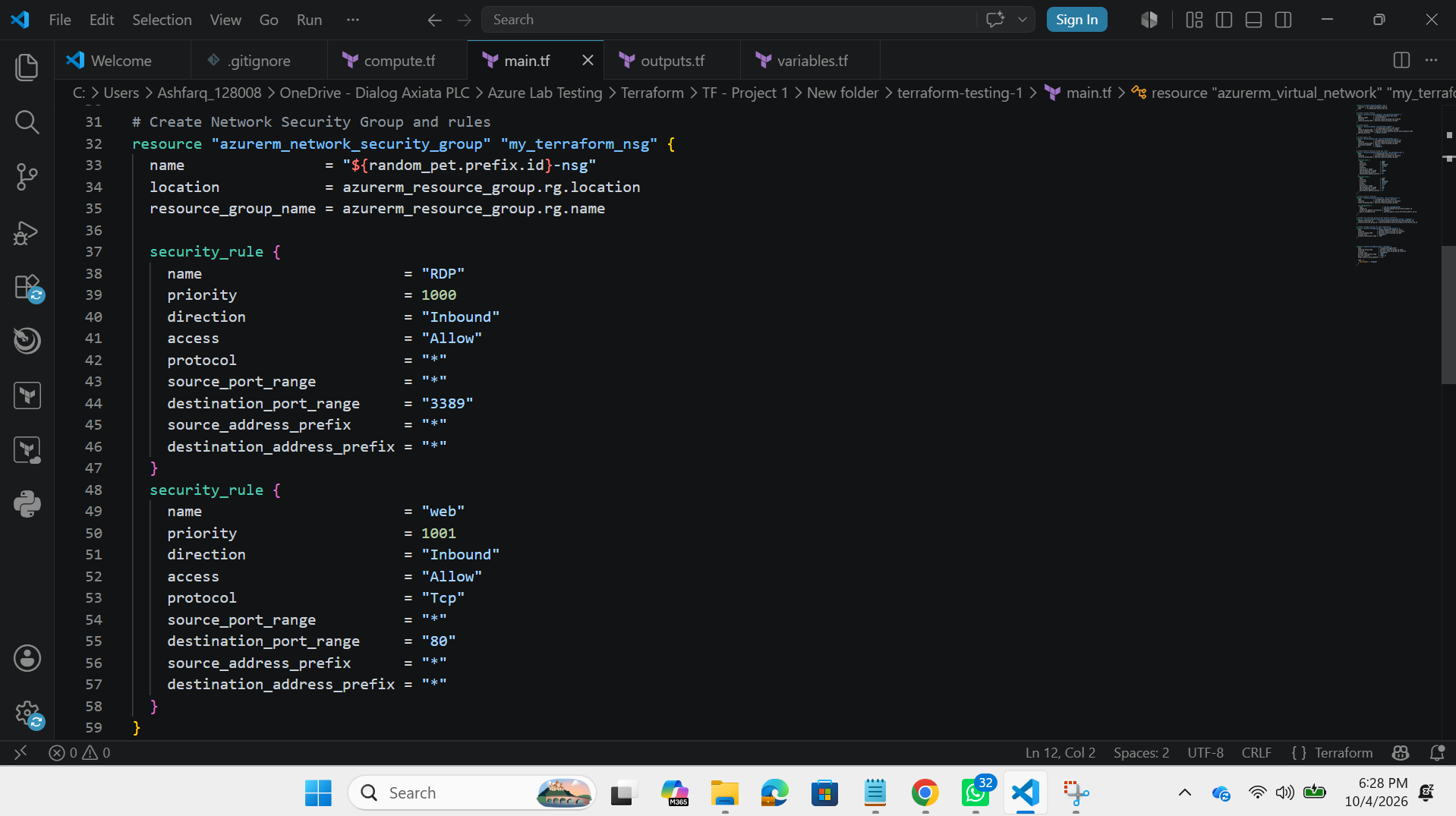
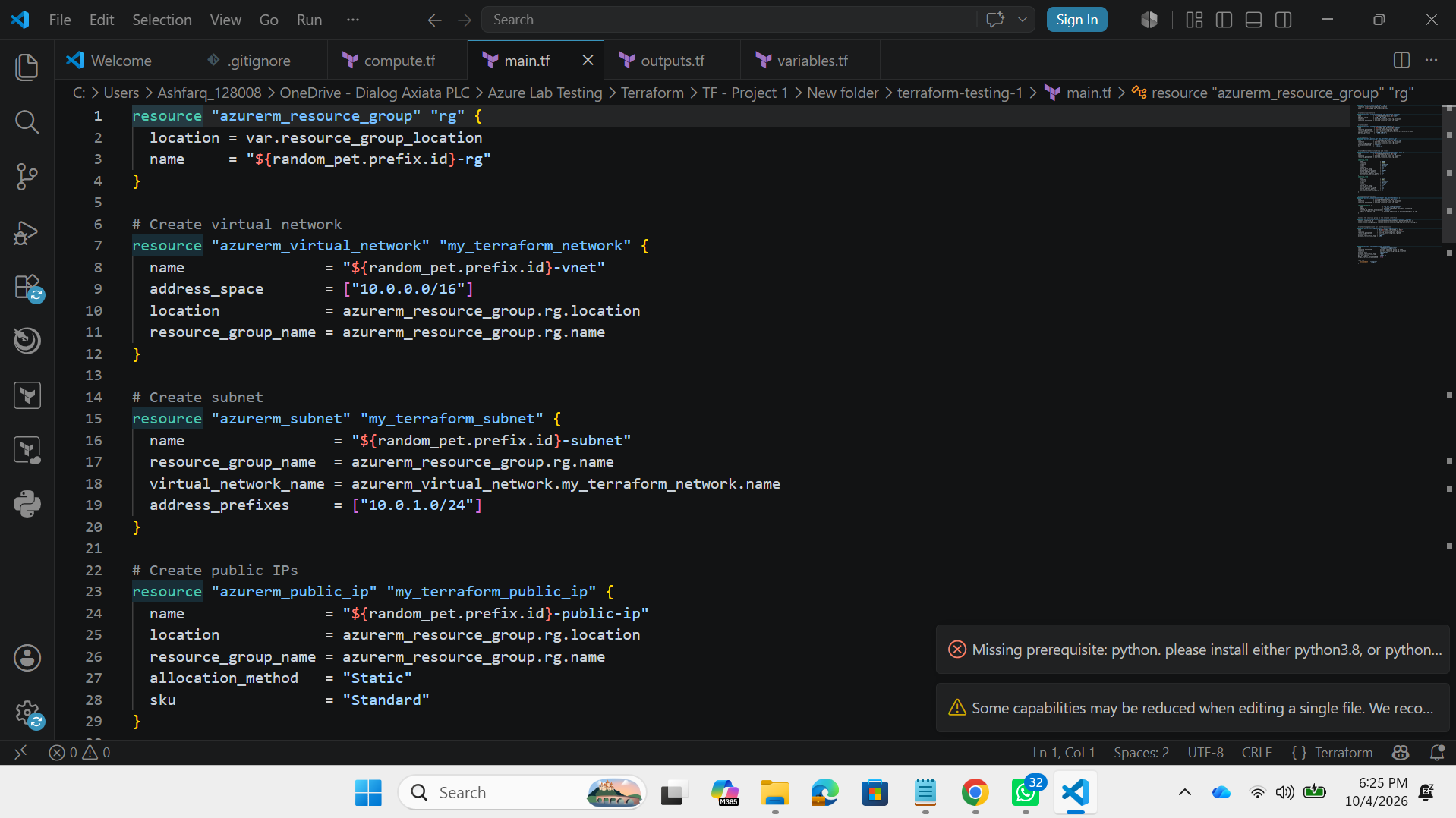
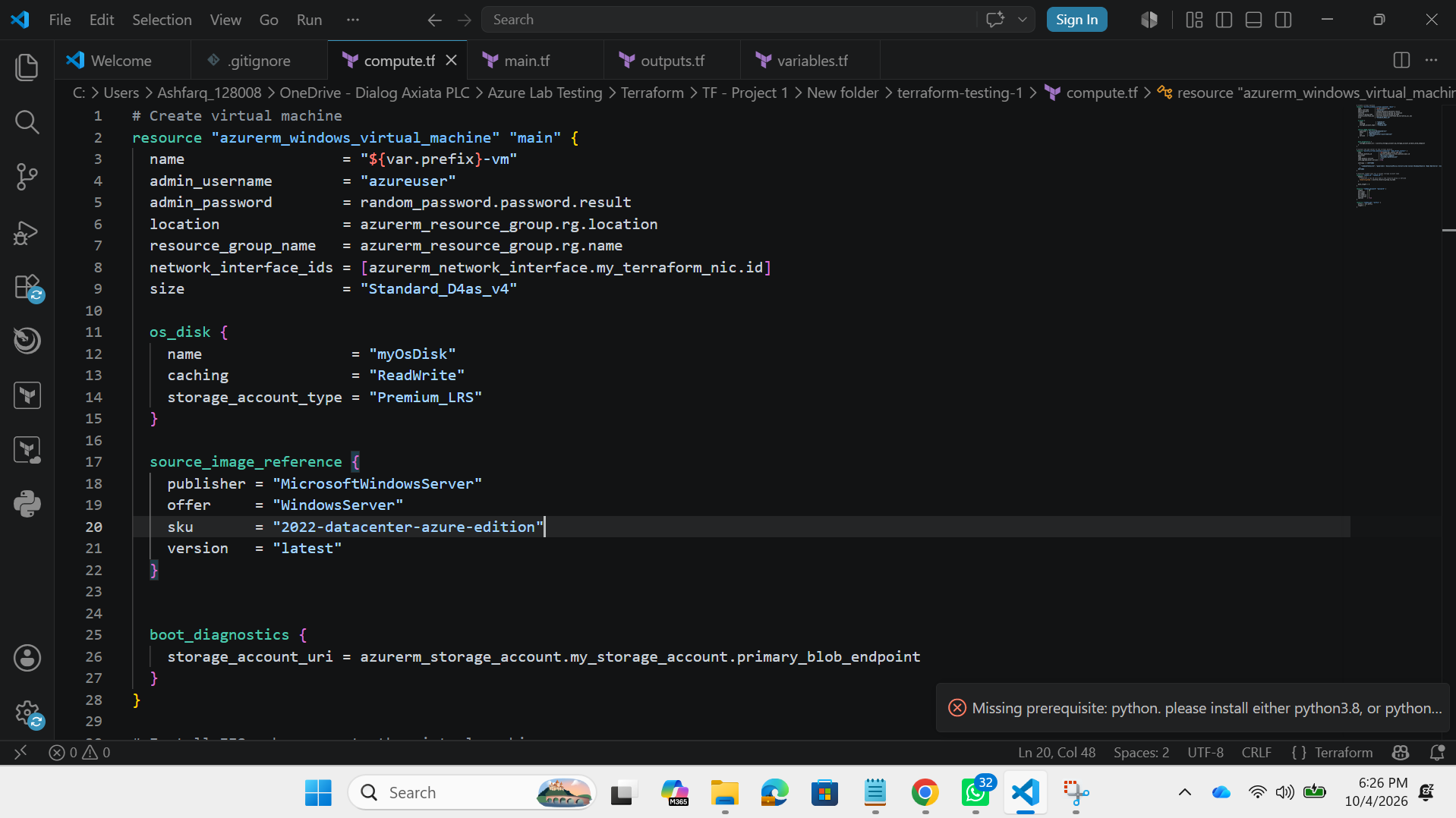
This is Infrastructure-as-a-Code to easily setup the environment, and this backup will easily make us setup the infrastructure... this is only an infrastructure level backup
If the primary environment is lost, we don't necessarily have to manually recreate every resource from memory. We can redeploy the infrastructure. This is one of the biggest differences between:
We have a backup.
and
We have a repeatable recovery process.
RPO and RTO
Whenever I discuss disaster recovery with customers or project teams, two terms always come up as these are extremely important when designing the DR strategy.
RPO – Recovery Point Objective (How much data can we afford to lose?)
RTO – Recovery Time Objective (How quickly do we need to recover?)
These numbers should come from business requirements, not from what happens to be convenient from a technical perspective.
An Example From Real Architecture Discussions
One thing I have learned from architecture discussions is that disaster recovery rarely starts with a technical solution. It usually starts with a simple business question: “How long can we afford to be unavailable?” Once that question is answered, the architecture becomes much easier to shape.
For example, if we are designing an internal application where a few hours of downtime is acceptable, I may not immediately recommend a full multi-region architecture. A well-designed App Service environment in a single region, combined with appropriate availability, monitoring, backup, and a documented recovery procedure, may be sufficient. On the other hand, if the application is customer-facing or supports a critical business process where even a short outage has a significant impact, then the conversation changes. We may need another region, replicated data, traffic failover, and a properly tested recovery process.
This is why I don't believe that “multi-region” automatically means “better architecture.” It may provide a higher level of resilience, but it also introduces additional complexity, cost, and operational responsibility. The right architecture is the one that matches the business requirement.
One question I normally ask during these discussions is: “If the primary region is unavailable tomorrow morning, what exactly are we going to do?” If the answer is simply “restore the backup,” then I know we haven't finished designing the DR solution yet. We need to understand where the application will run, where the data will come from, how traffic will be redirected, how secrets and configurations will be restored, and how we will validate that the recovered environment is actually usable.
That is where disaster recovery becomes more than an Azure service configuration. It becomes an end-to-end recovery strategy.
Single Region vs Multi Region
There is always an interesting discussion around whether an application really needs to be deployed across multiple Azure regions. My approach is to first understand the application's availability requirement rather than making multi-region deployment a default design.
A single-region architecture can still provide a strong level of availability. For example, the application can use an appropriate App Service Plan configuration, availability zones where supported, autoscaling, monitoring, backups, and resilient dependent services. For many workloads, this provides a good balance between availability, operational simplicity, and cost.
The limitation is that the entire workload is still dependent on that Azure region. If there is a major regional outage, having multiple App Service instances within that region does not solve the problem. This is where a multi-region architecture becomes valuable.
With a multi-region design, I would typically have the application deployed independently in two Azure regions, with a service such as Azure Front Door managing traffic between them. The application should ideally be deployable in both regions using the same deployment process, while the data layer needs its own replication and recovery strategy.
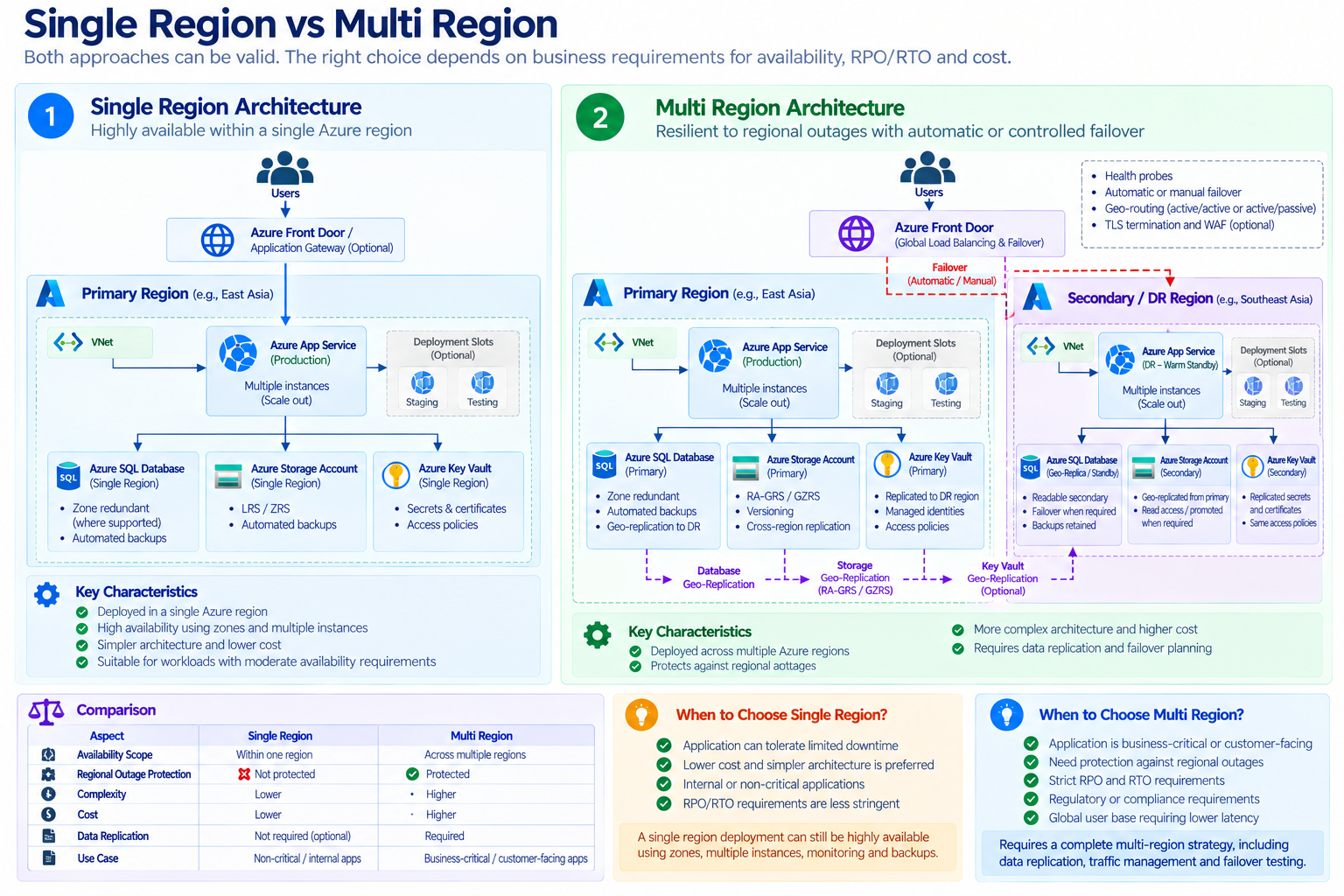
However, this is where things become more complicated. Replicating the application itself is usually not the hardest part. The real challenge is everything around it. What happens to the database? Where is the application state stored? How is storage replicated? What happens to background jobs? Are external integrations available from the secondary region? Are the certificates and secrets available? How do we redirect traffic? How do we know when to fail over, and who makes that decision?
So when I look at multi-region architecture, I don't see it as simply “two App Services instead of one.” I see it as two complete application environments that need to be capable of supporting the business when one environment is unavailable.
That distinction is important because a second region that cannot actually operate the application independently is not really a DR solution. It is simply another deployment.
App Service Backup
When we talk about backup for Azure App Service, I think it is important to understand exactly what problem we are trying to solve. Backup is extremely useful, but I don't treat it as a replacement for a complete disaster recovery strategy.
For me, backup is primarily about giving the application another recovery point. If something goes wrong with the application, configuration, or supported content, having a previous backup gives us an additional option instead of rebuilding everything from scratch.
But the conversation changes when we are dealing with a major infrastructure or regional failure.
Imagine that our production application is running in one Azure region and that region becomes unavailable. Having an App Service backup does not automatically mean that users can continue accessing the application. We still need somewhere to recover the workload, a way to recover the data, the required configuration and secrets, connectivity to dependent services, and a method of directing users to the recovered environment.
This is why I normally separate the backup strategy from the disaster recovery strategy.
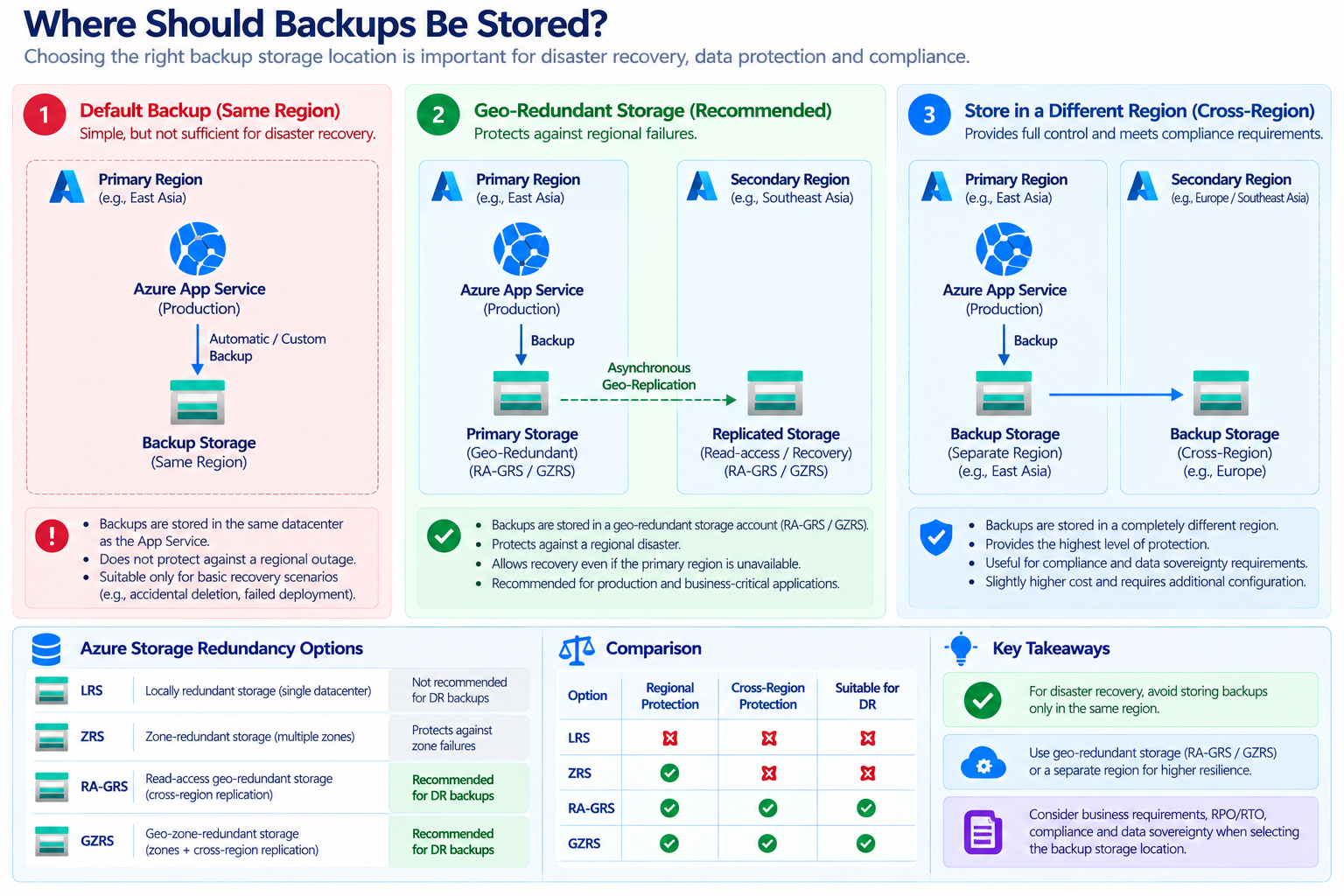
Where Should Backups Be Stored?
This is another area that deserves attention.
If your application is running in Region 1 and the backup is also stored only within the same regional infrastructure, you may not have the protection you expect against a regional disaster.
Microsoft notes that automatic App Service backups are stored in the same datacenter as the App Service and should not be relied on as your disaster recovery plan.
For disaster recovery, I therefore prefer considering geographically resilient backup storage where the workload and business requirements justify it.
Disaster Recovery Is Also About People
This is something that sometimes gets forgotten in technical architecture diagrams.
Imagine there is a major outage at 2 AM. The technology may be perfectly designed. the questions that I have faced and raised are:
- who is going to make the decision to fail over?
- Who has access?
- Who contacts the database team?
- Who communicates with the business?
- Who validates the application after recovery?
- Who decides when to fail back?
These questions are part of Business Continuity.
A good DR plan should therefore include:
Failover and Failback
Another important lesson I've learned is that people often spend a lot of time discussing failover and very little time discussing failback.
- Failover means: Move the workload from the primary environment to the DR environment.
- Failback means:Once the primary environment is healthy again, move the workload back.
A Reference DR Architecture
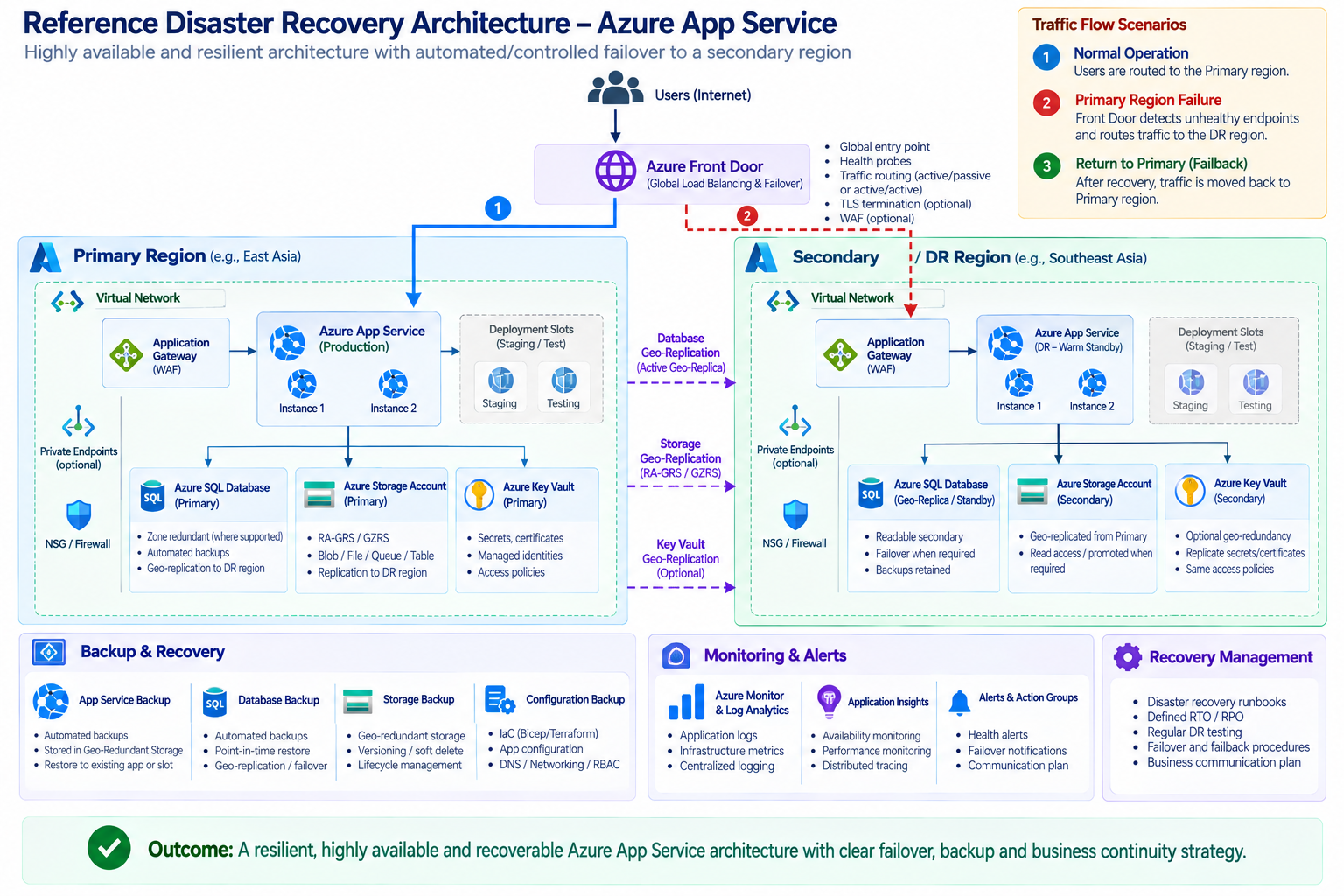
The exact implementation will depend heavily on the application and the Azure services used.
But I like this architecture because it makes one thing clear:
DR is not just another App Service.
It is an entire recovery ecosystem.
What About Key Vault?
Security configuration also needs to be considered. Imagine the application is successfully deployed to the secondary region but can't retrieve:
- Database credentials
- Certificates
- API keys
- Secrets
The application may still fail. This is why services such as Azure Key Vault, managed identities, networking, private endpoints, DNS, and access control should all be considered as part of the recovery design.
The DR environment should be able to access the required security dependencies without introducing new security risks.
Monitoring During a Disaster
Monitoring becomes even more important during DR. We need to know:
- Is the secondary application healthy?
- Is traffic reaching the correct region?
- Are users receiving errors?
- Is database replication healthy?
- Is storage replication healthy?
- Are APIs responding?
- Are response times acceptable?
This is where the work from Part 4 – Monitoring & Performance Optimization becomes extremely valuable. Refer to this https://techaiquantum.com/2026/07/13/azure-app-service-monitoring-performance-optimization/
Your DR architecture should not be a "set it and forget it" environment. It should be monitored continuously.
My Checklist will cover
When I'm reviewing an App Service DR design, I like to ask a few simple questions on the following:
Reach out to find our these questions and concerns
Conclusion
Over time, my view of backup and disaster recovery has changed. Earlier, I would have looked at backup as a technical requirement:
Configure backup → Check that it succeeded → Done.
Today, I look at it very differently. For me, a proper resilience strategy is:
Protect → Replicate → Recover → Validate → Monitor → Test → Improve
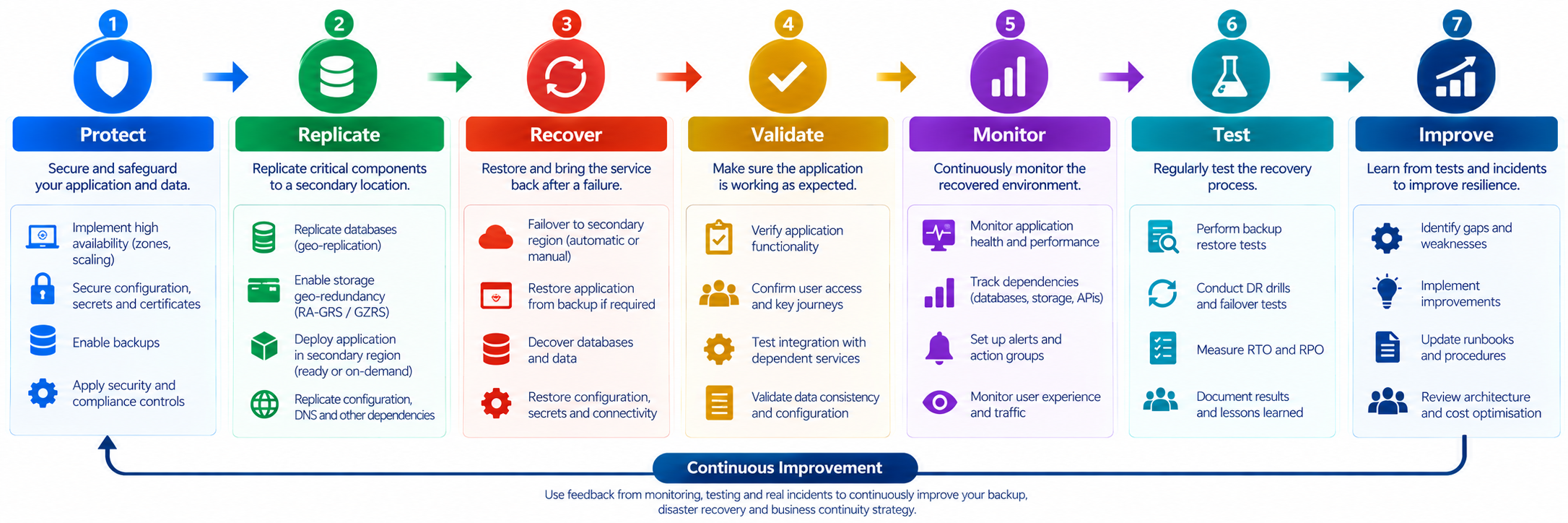
Backup is one part of that process. High availability is another. Disaster recovery is another. And business continuity brings all of them together.
The biggest lesson I've learned is that availability and recoverability are not the same thing.
You can have multiple App Service instances, Availability Zones, autoscaling, monitoring and deployment slots, and still have a serious business continuity problem if your data, dependencies, or recovery process haven't been designed properly.
That's why I believe disaster recovery shouldn't be something we think about after the production environment is built. It should be part of the architecture from the beginning. Because the real test of a cloud architecture isn't how it behaves when everything is working perfectly.
The real test is how well it recovers when something goes wrong.
References
The Diagrams used are prompt generated diagrams based on the input
