

Overview
In the previous parts of my Azure App Service series, I covered the fundamentals of App Service, certificates and security, Microsoft Defender for Cloud, monitoring and performance optimization, and scaling applications for high availability.
For Part 6, I wanted to cover something that I consider extremely important once an application moves beyond the development stage and starts becoming a production workload:
How do we deploy changes safely?
Because from my experience, getting an application deployed to Azure is usually not the difficult part.
The difficult part is making sure that the deployment doesn't become an incident.
I've seen environments where the application itself was perfectly healthy, but a new release introduced an unexpected issue. I've also worked on deployments where the application had to be updated during a limited maintenance window, and the priority was to make the release as smooth as possible without impacting users.
This is where Azure App Service Deployment Slots and CI/CD pipelines become very useful.
The combination of these two gives us a much more controlled approach:
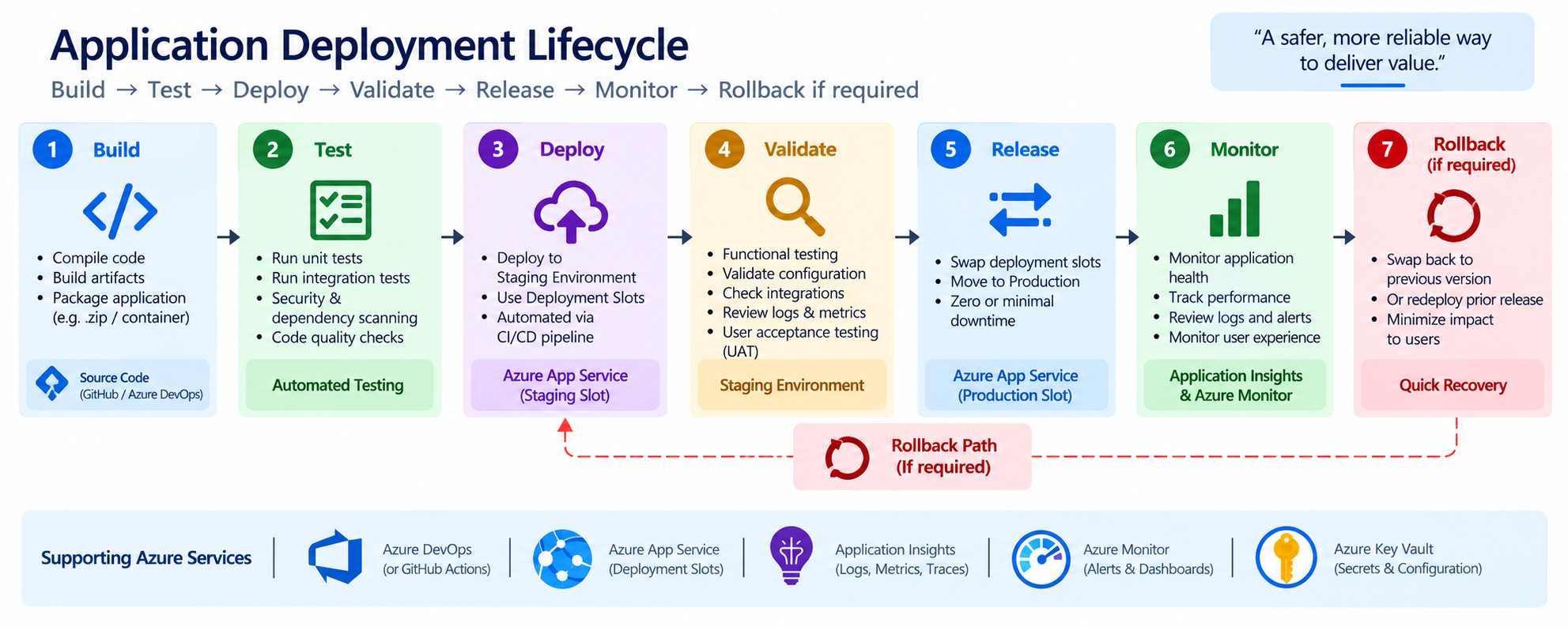
Instead of treating deployment as a single activity, we treat it as a process.
Why I Prefer Controlled Deployments
From my experience, one of the biggest risks in a production environment is not necessarily the application itself, but the way changes are introduced.
I've seen situations where a deployment was technically successful, but the new version introduced an unexpected issue that only became visible after users started accessing the application.
That's why I prefer a controlled deployment approach.
Instead of deploying directly to production, I prefer having a process where the new version goes through the necessary build, testing, staging, and validation steps before it reaches production. For me, the flow is simple:
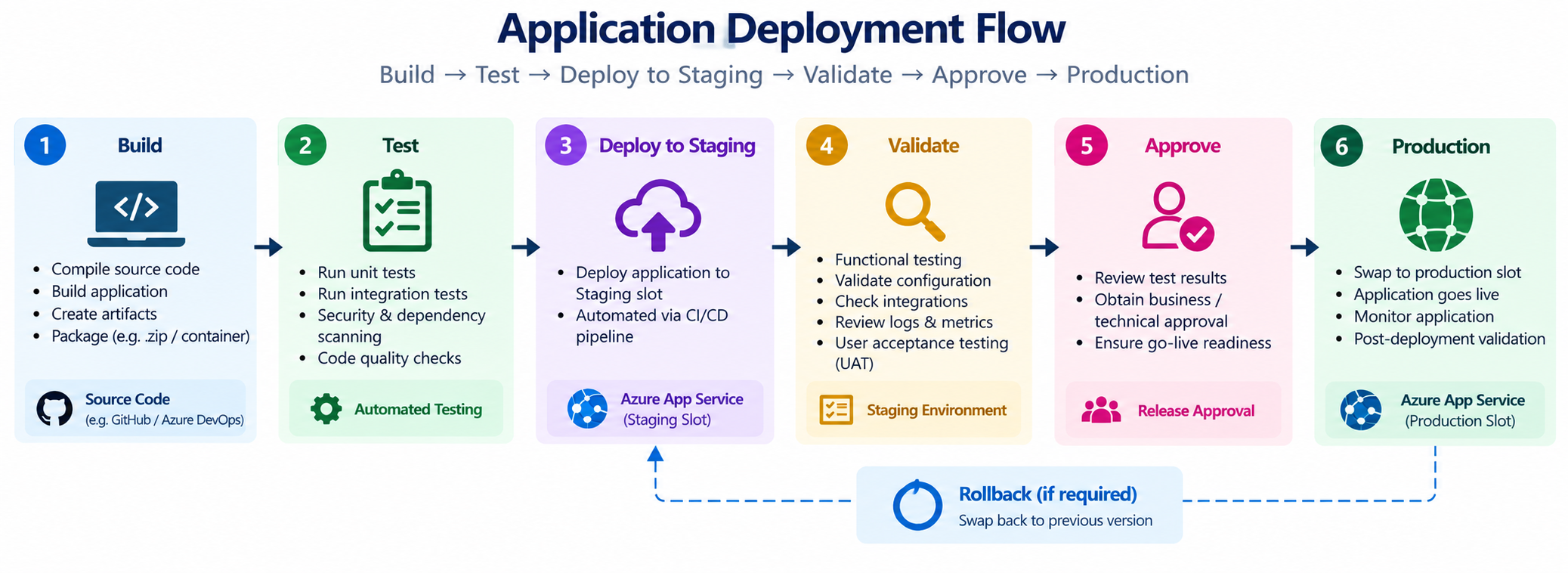
Additional to the previous diagram, this has the stages of Approval
This gives the team an opportunity to identify issues before they impact users and It also gives us a clear rollback path if something doesn't go as expected.
I believe this becomes even more important as applications grow and become business-critical. The objective isn't to make deployments complicated. It's to make them predictable, repeatable, and less risky.
At the end of the day, I would rather spend a little more time validating a release than spend much more time troubleshooting a production incident later.
That's why, whenever the workload and business requirements justify it, I prefer combining CI/CD pipelines with Azure App Service Deployment Slots to create a more controlled deployment process.
What Are Deployment Slots?
Azure App Service provides Deployment Slots, which allow us to have multiple environments for the same App Service application. The most common example is:
Instead of deploying the new version directly into Production, we can deploy it to the Staging Slot first.
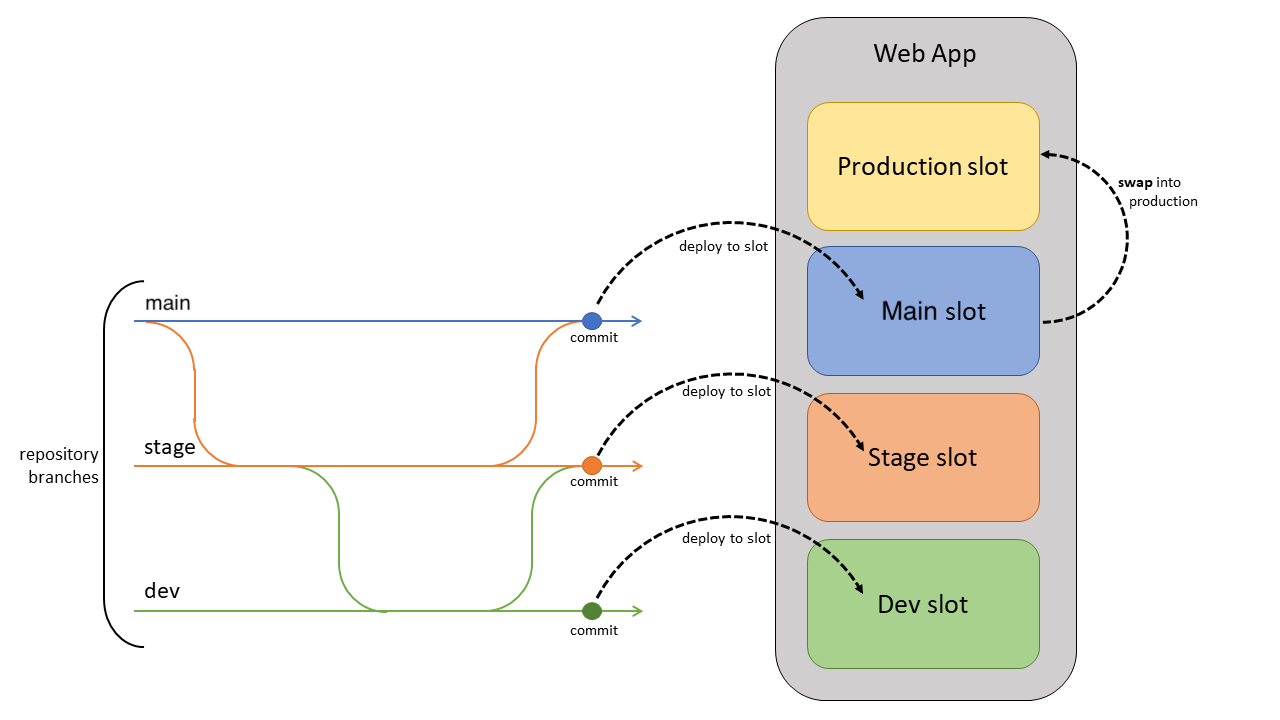
Now we have the opportunity to test v1.1 before making it the production version.
This is a relatively simple concept, but in my experience it can make a significant difference to how confidently you can release an application.
I would also recommend another SLot as it involves Enterprise Level Recommendation;
How I Look at Deployment Slots
I normally think about a deployment slot as a safety layer between the development process and production users. Instead of saying:
"The developer has completed the code, so let's deploy it."
the process becomes:
"The code is completed, let's deploy it somewhere safe, validate it,
and then decide whether it's ready for production."
That small change in mindset can make the overall deployment process much more controlled.
A Typical Deployment Flow
A basic deployment process could look like this:
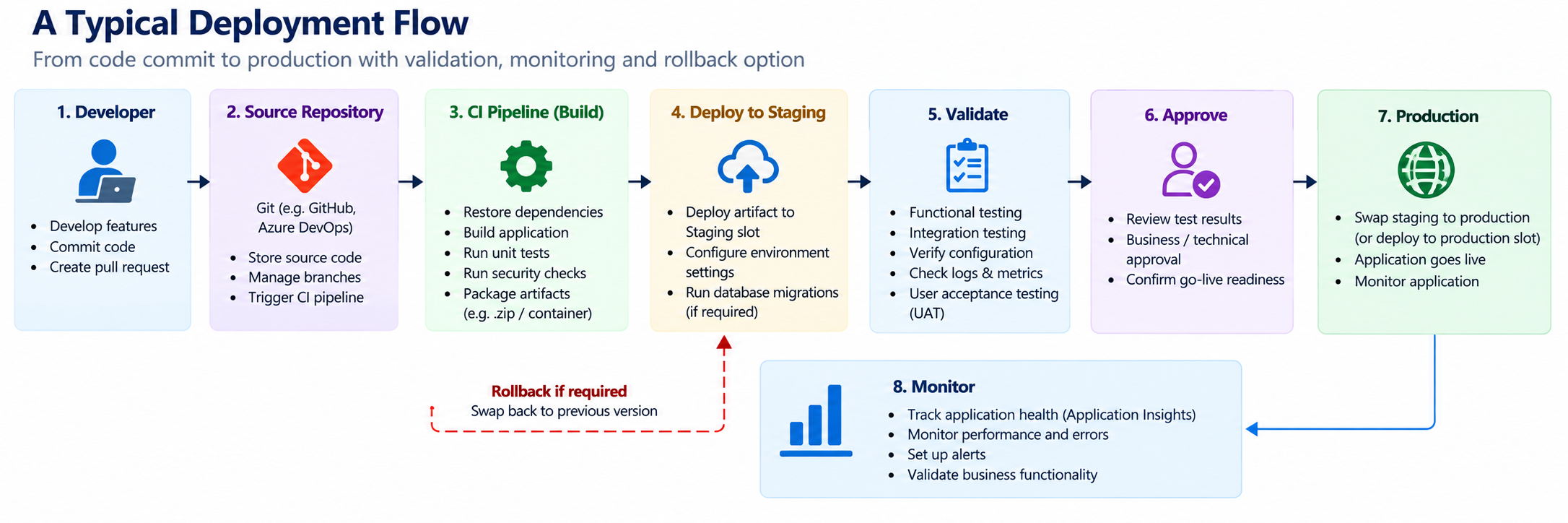
This is the kind of flow I would generally prefer for an important production application.The key point is that Production is not the first place where the new version is tested.
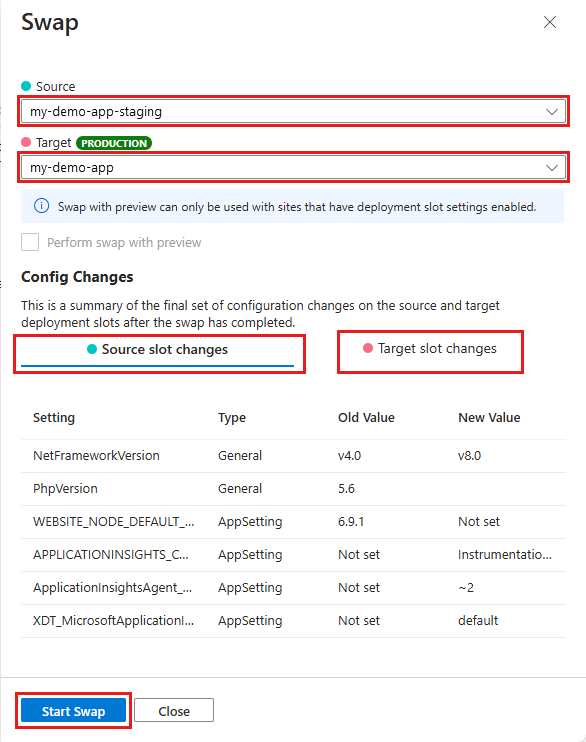
What Happens During a Slot Swap?
Let's say we currently have:
We test Version 1.1 and everything looks good. We can then perform a slot swap. After the swap:
So the new version becomes production while the previous version remains available in the other slot. This is one of the features I find particularly useful when planning a rollback strategy.
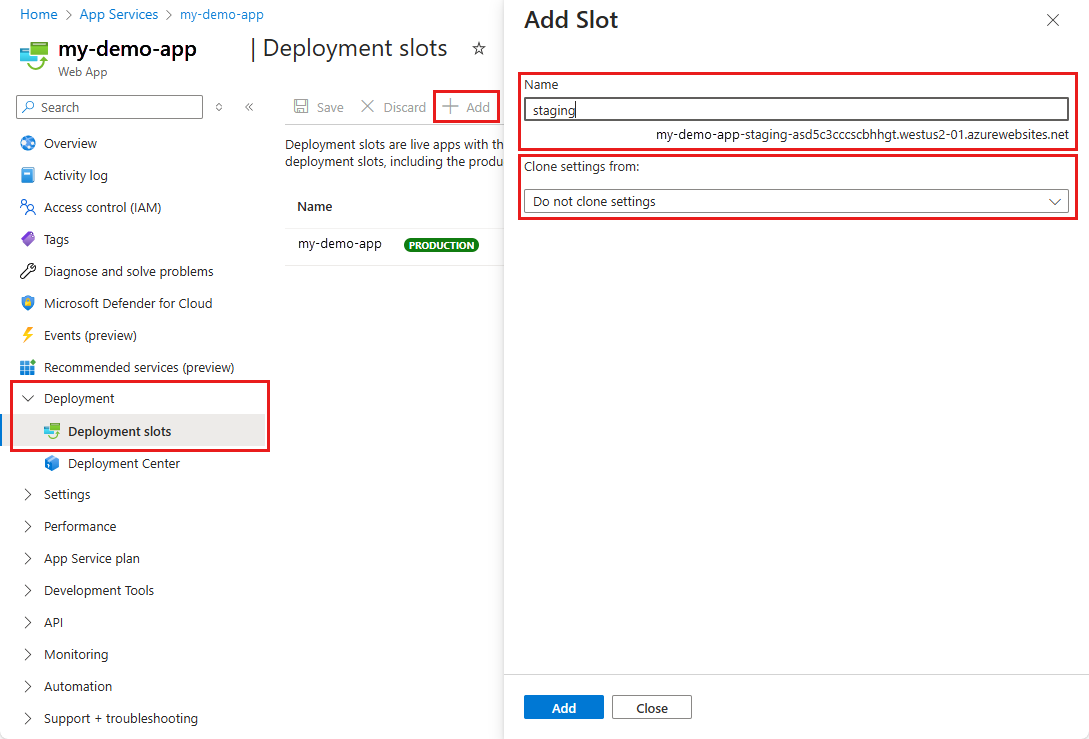
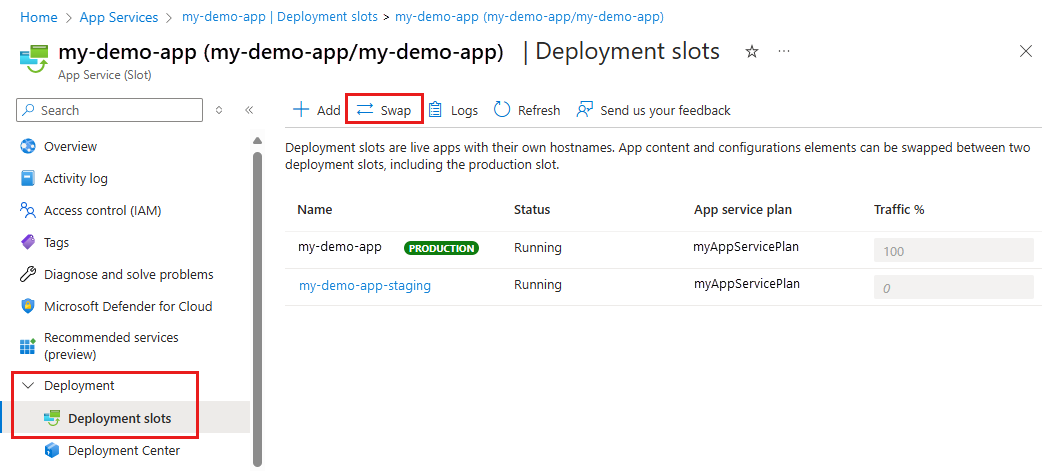
This is how you configure Deployment SLots
Why This Is Useful for Rollback
Imagine we release Version 2.0. Initially everything looks fine. Then, after some time, users start reporting an issue. If the previous version is still available in the other slot, we have a much simpler path to reverse the deployment.
The actual rollback strategy needs to be designed and tested properly, but the ability to retain the previous version in a slot is extremely useful. For me, this is one of the biggest advantages of deployment slots.
But There Is More to It Than Just Swapping
One thing I always pay attention to when designing deployment slots is configuration. It's very easy to think:
"I have a Production slot and a Staging slot, so everything is isolated."
That's not necessarily the case. Consider an application that uses:
We need to make sure that the Staging environment doesn't accidentally connect to production resources. For example:
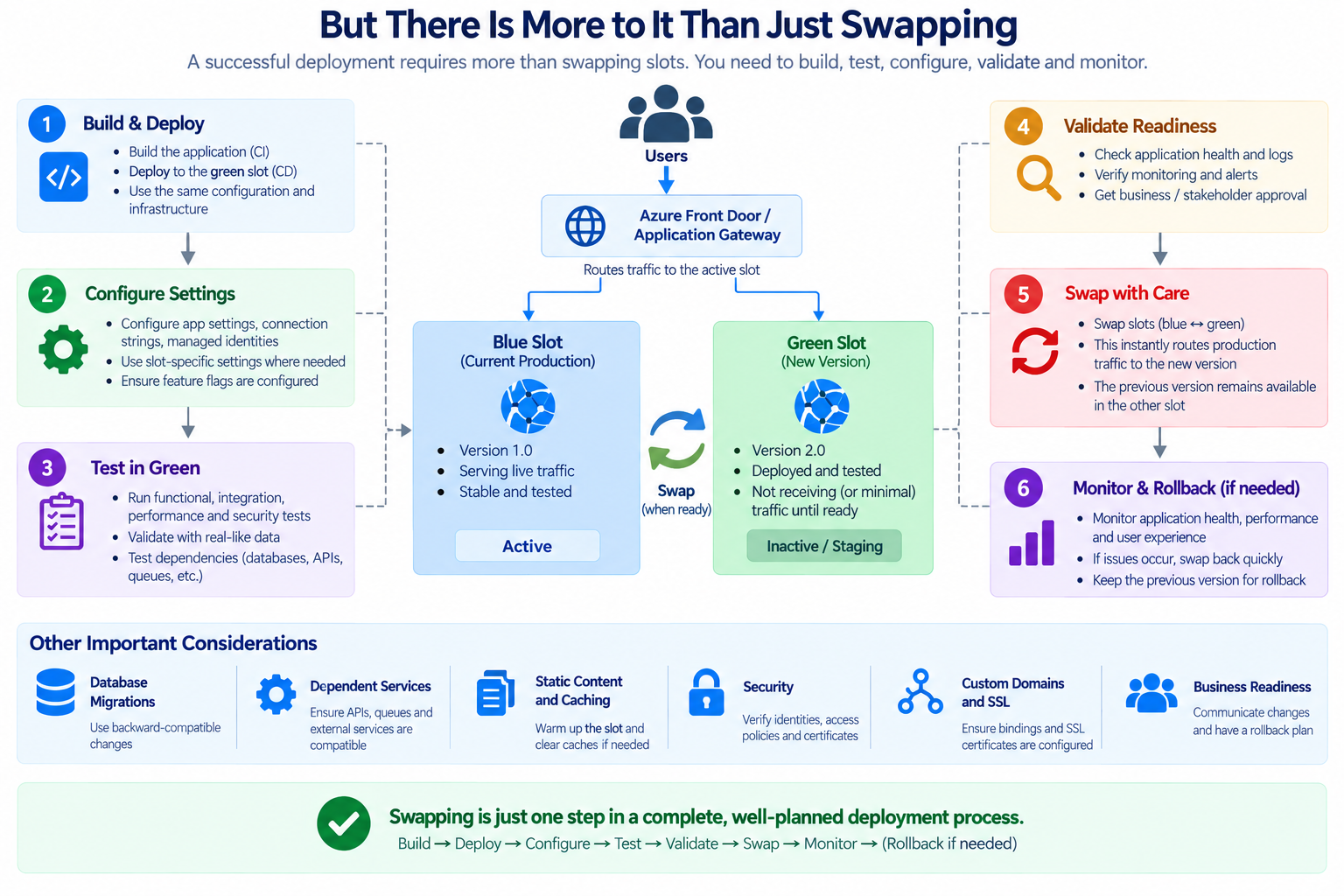
This separation is particularly important when we're testing database changes. You don't want a developer testing a new feature in Staging and accidentally modifying production data.
Slot-Specific Configuration
This is one of those areas where proper planning becomes important. Some configuration values should remain specific to a particular slot. For example:
The same applies to:
For Sensitive Information, I prefer using Azure Key Vault and managed identities rather than putting secrets directly into the source code. This will also connect back to Part 2 of the Series, where I have discussed about certificates, keys, and securing application configuration
Now Let's Talk About CI/CD
Deployment Slots solve one part of the problem. The next question is:
How do we get our application into the Staging slot in a consistent way?
This is where CI/CD comes in. CI/CD stands for: Continuous Integration / Continuous Delivery.
The basic idea is to automate the process of taking code from a developer's repository through build, testing, and deployment. Instead of someone manually performing every deployment, the pipeline handles the repetitive steps.
From Manual Deployment to Automation
A manual deployment will work for a small application. But imagine doing this every day across several applications and environments. The possibility of human error increases, to overcome this where the CI/CD came into the picture
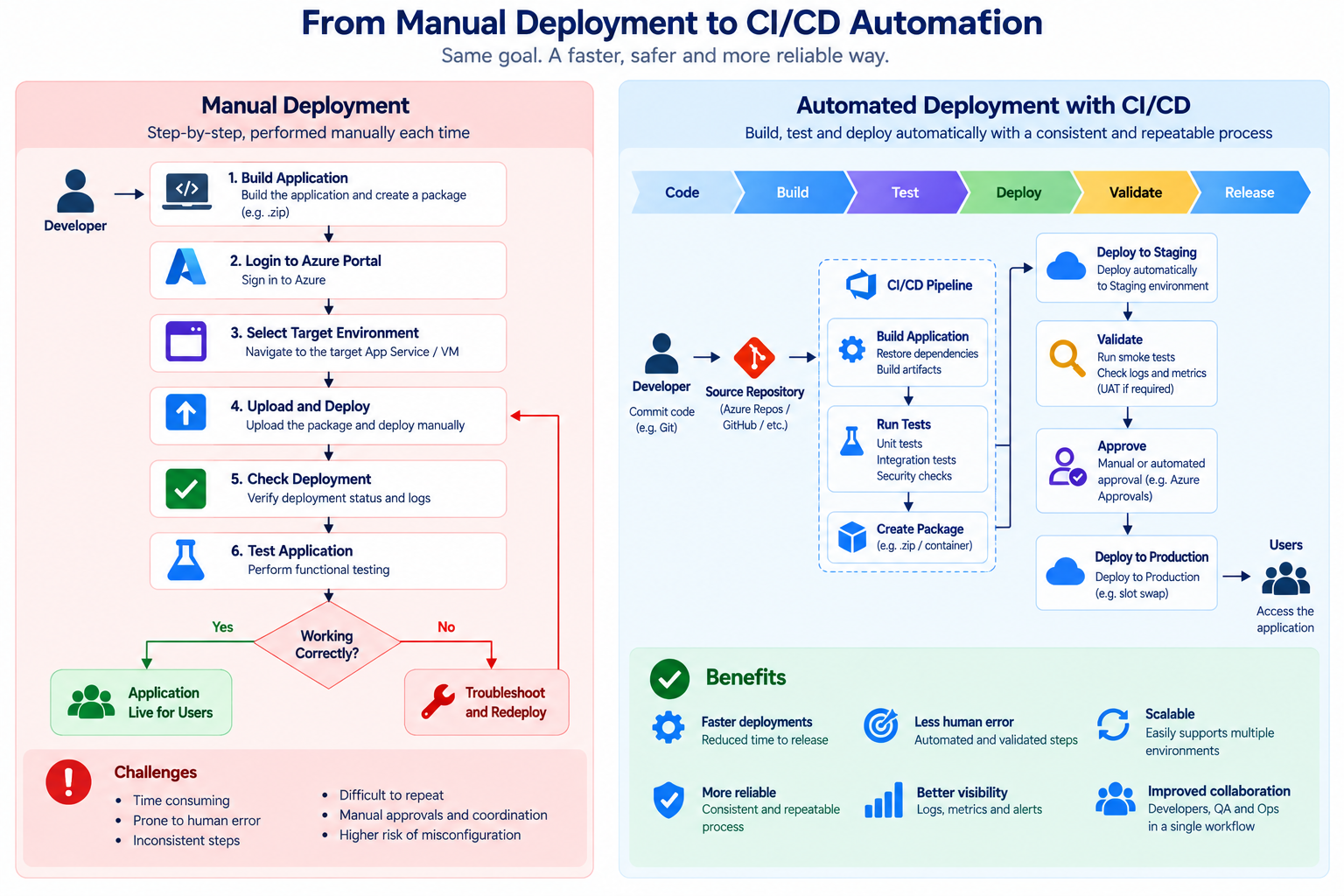
The process becomes repeatable
GitHub Actions vs Azure DevOps
There are different tools we can use to implement CI/CD for Azure App Service. Two commonly used options are:
I've worked with environments where the choice of tool depends heavily on the organization's existing development and DevOps practices. If the organization already has its source code and workflows in GitHub, GitHub Actions can be a natural fit.
If the organization already has a strong Azure DevOps implementation, Azure Pipelines may make more sense. For me, the important thing isn't choosing a particular tool just because it's popular.
The important thing is creating a reliable deployment process that the team can understand, maintain, and repeat.
Will write how to work with Azure DevOps in the upcoming sections
What Should a CI/CD Pipeline Actually Do?
I don't like thinking of a CI/CD pipeline as simply:
"A tool that deploys code."
A good pipeline should provide controls around the release. Each stage gives us another opportunity to catch an issue before it reaches the customer.
Automated Testing
This is probably one of the most important parts of CI/CD. Let's say a developer makes a change to an application. The pipeline starts automatically.The first thing we want to know is:
Does the application build successfully?
Then:
Do the automated tests pass?
If the tests fail, the pipeline should stop. This is much better than discovering the problem after deployment.
Security Checks in the Pipeline
Another area I increasingly consider important is security. A modern deployment pipeline shouldn't only ask:
"Does the code work?"
It should also consider:
"Is it safe to deploy?"
Depending on the organization and application, the pipeline can include security checks such as:
This creates another layer of protection before the application reaches production.
Deploying to the Staging Slot
Once the application passes the initial checks, the pipeline can deploy it to the Staging slot.
Now we have a real Azure environment where we can validate the application. This is much more useful than relying only on local testing.
What Do I Check in Staging?
This is where the process becomes more practical. Depending on the application, I would typically want to verify:
And this is where Application Insights becomes useful again.
Monitoring After Deployment
As I discussed in Part 4 of this series, monitoring is not something I would separate from deployment. The deployment pipeline can tell me:
"Deployment completed successfully."
But Application Insights and Azure Monitor can tell me:
"The application is actually behaving normally."
Those are two different things.
Refer to the Series 4 (Part 4) for more information on Monitoring
https://techaiquantum.com/2026/07/13/azure-app-service-monitoring-performance-optimization/
Only after looking at the application from an operational perspective do I feel more confident about the release.
Production Approval
For some applications, I would not recommend automatically pushing every change into production.
Instead, introduce an approval stage.
This becomes particularly important for applications supporting critical business processes.The approval process doesn't necessarily need to be complicated. The idea is simply to make sure that someone has reviewed the release before it reaches production.
Blue-Green Deployment
Deployment slots also provide a good foundation for a Blue-Green deployment approach. The concept is fairly simple. One environment represents the current production version. The other contains the new version.
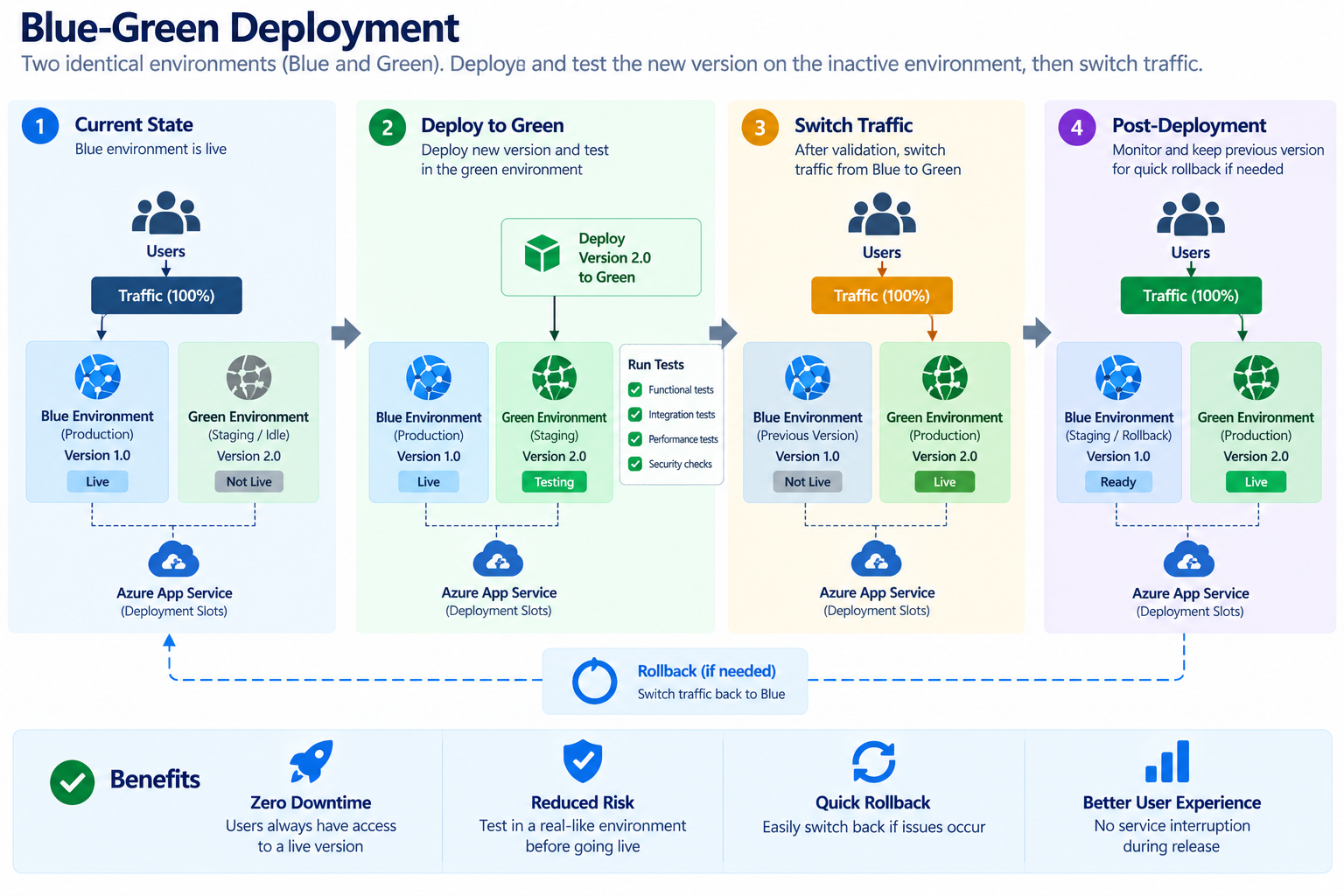
We deploy and validate the new version separately. Once we're confident, we switch production to the new version. This gives us a much safer way of introducing changes.
Canary Releases
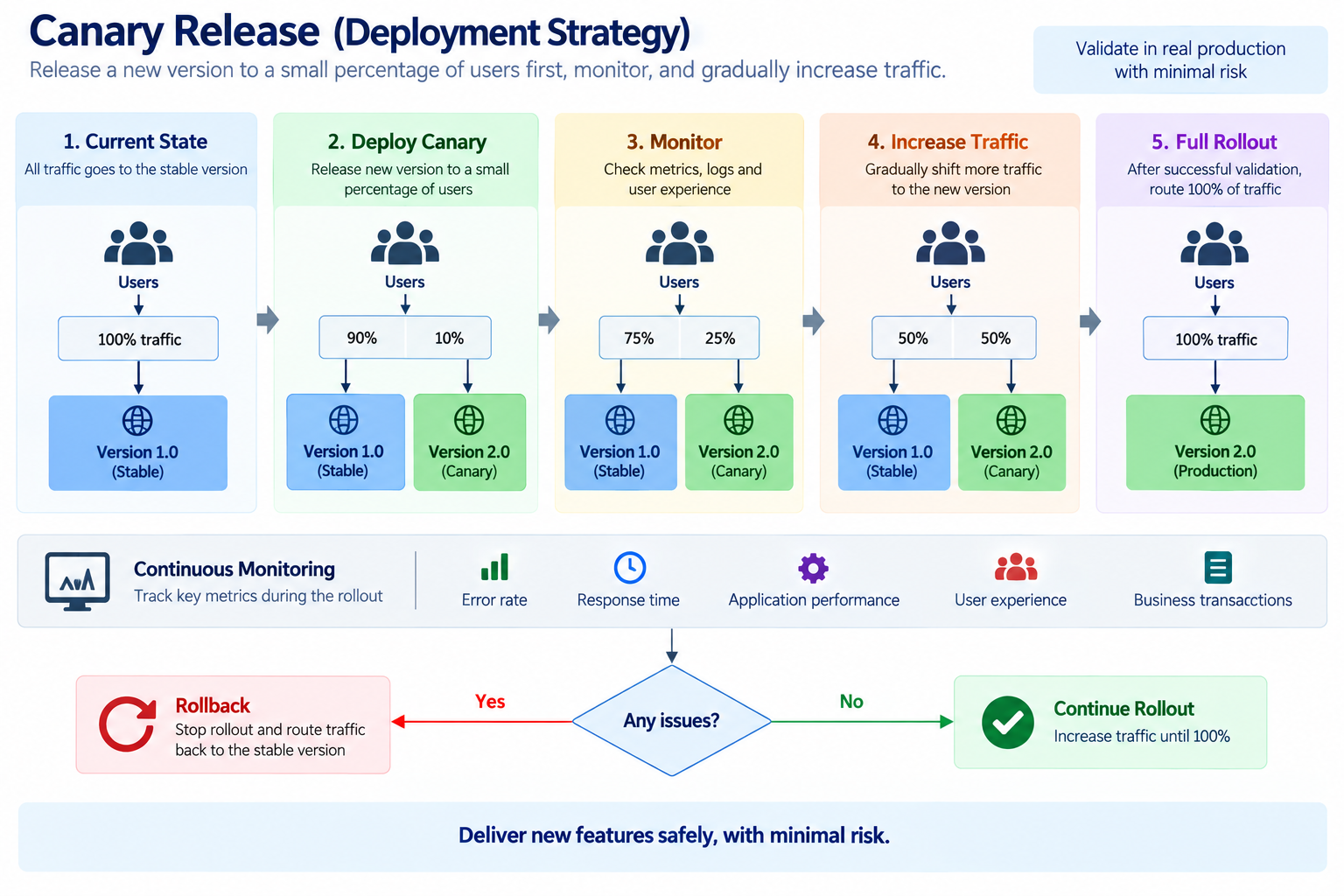
For some workloads, even switching 100% of users to a new version at once may not be desirable. A canary deployment takes a more gradual approach.
THis is very interesting approach as the user will not see the difference except for the version upgraded features in the application
We can monitor Version 2. If everything looks good, we gradually increase the traffic. This approach is especially useful when the impact of a release is significant and we want additional confidence before fully switching users.
One Thing I've Learned: Deployment Success ≠(NOT) Application Success
This is probably one of the most important points I would highlight from my experience. A pipeline can say:
Deployment Successful
while the application can still be broken. For example: Erors throwing up as
That's why I always prefer combining:
CI/CD + Deployment Slots + Monitoring
rather than treating deployment as a standalone activity.
A Production Deployment Architecture
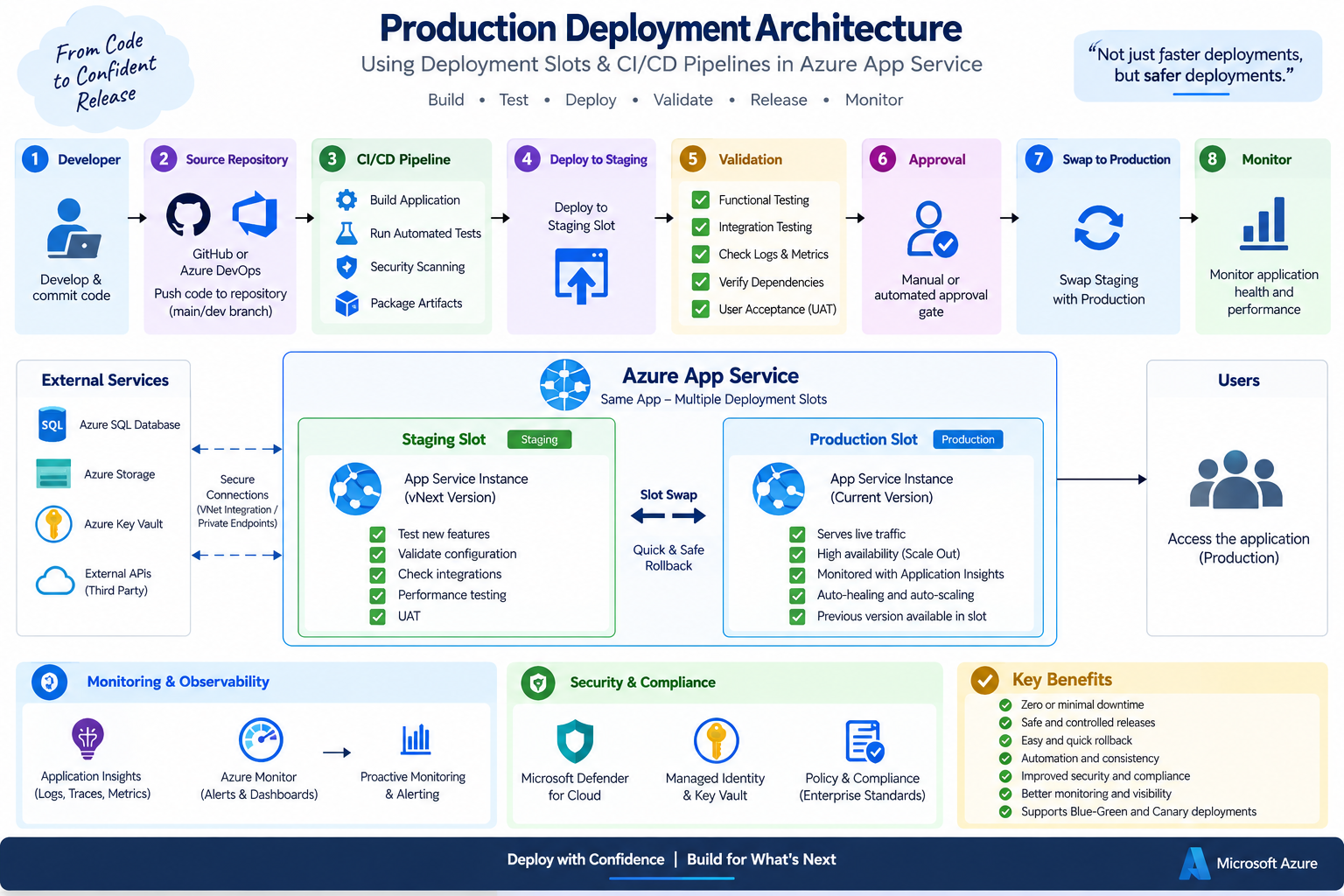
This is the architecture I would generally recommend as a starting point for a production App Service deployment process. Of course, the exact implementation will depend on the application's requirements and the organization's existing DevOps practices.
What About Database Changes?
This is another area where we need to be careful. Where we deploying application code is one thing.
Changing the database is another.
Imagine Version 2.0 requires a new database column. If we change the database in a way that Version 1.0 cannot understand, rolling back the application may not be enough.
This is why database changes need to be considered as part of the deployment strategy.
For more complex applications, I prefer database migration approaches that are designed to support backward compatibility during the transition. The principle is:
Don't design your application rollback strategy without considering your database rollback strategy.
Will speak about this more on Azure DevOps Activities
Practical Deployment Checklist - Aligning to Best Practices
Before I move an application into production, I usually go through a simple checklist:
Before Deployment
- Code review completed
- Build completed successfully
- Automated tests passed
- Security checks completed
- Application configuration reviewed
- Database changes reviewed
- Rollback plan prepared
During Deployment
- Deploy the new version to the Staging Slot
- Perform functional and integration testing
- Verify application and API health
- Check Application Insights and logs
- Validate external dependencies
- Obtain production approval
- Perform the Slot Swap
After Deployment
- Monitor application health
- Check HTTP errors and exceptions
- Check response time and performance
- Monitor database and external dependencies
- Verify critical business functions
- Keep the rollback option available
For me, having this checklist makes the deployment process more predictable and helps ensure that we're not just checking whether the deployment completed successfully, but also whether the application is actually healthy after the release.
Conclusion
From my experience, deploying an application to Azure is only one part of the journey. What really matters is how safely and consistently we can manage changes once the application is running in production.
Deployment Slots and CI/CD pipelines provide a practical way to achieve this. Instead of deploying changes directly to production, we can build, test, deploy to a staging environment, validate the application, and then promote the release with much more confidence.
For me, the real value comes from bringing these practices together with monitoring, proper, configuration management, security checks, and a clear rollback strategy.
At the end of the day, the goal isn't simply to deploy faster.
It's to deploy with confidence, reduce risk, and keep the application available for the people who depend on it.
Reference
- https://learn.microsoft.com/en-us/azure/app-service/deploy-staging-slots?tabs=portal
- https://learn.microsoft.com/ms-my/azure/app-service/deploy-best-practices?
- https://learn.microsoft.com/en-us/azure/app-service/deploy-github-actions?tabs=openid%2Caspnetcore#prerequisites
- https://learn.microsoft.com/en-us/azure/app-service/deploy-staging-slots?tabs=portal
- https://learn.microsoft.com/en-us/azure/devops/pipelines/apps/cd/deploy-docker-webapp?view=azure-devops&tabs=java%2Cyaml
- https://learn.microsoft.com/en-us/azure/developer/azure-developer-cli/app-service-slots
- https://learn.microsoft.com/en-us/azure/app-service/tutorial-multi-region-app?view
