

Involvement of Security
Modern web applications face constant cyber threats; SQL injection, remote code execution, malicious bot traffic, credential theft, and weak application configurations are just a few examples. As organizations move quickly to cloud-native architectures, protecting apps running on Microsoft Azure is essential.
A powerful way to improve app security in Azure is Microsoft Defender for App Service, part of Microsoft Defender for Cloud.
This blog examines Defender for App Service: what it does, how it’s built, the security advantages it delivers, and best practices for deploying it across the enterprise.
What is Microsoft Defender for App Service?
Microsoft Defender for Cloud is a Cloud Native Application Protection Platform (CNAPP), which is a unified solution that combines multiple cloud security tools to protect applications across their entire lifecycle. The solution provides a comprehensive view of your security posture across your cloud and on-premises resources.
This blog is specific to Defender for Cloud; (Cloud Workload Protection) for App Service
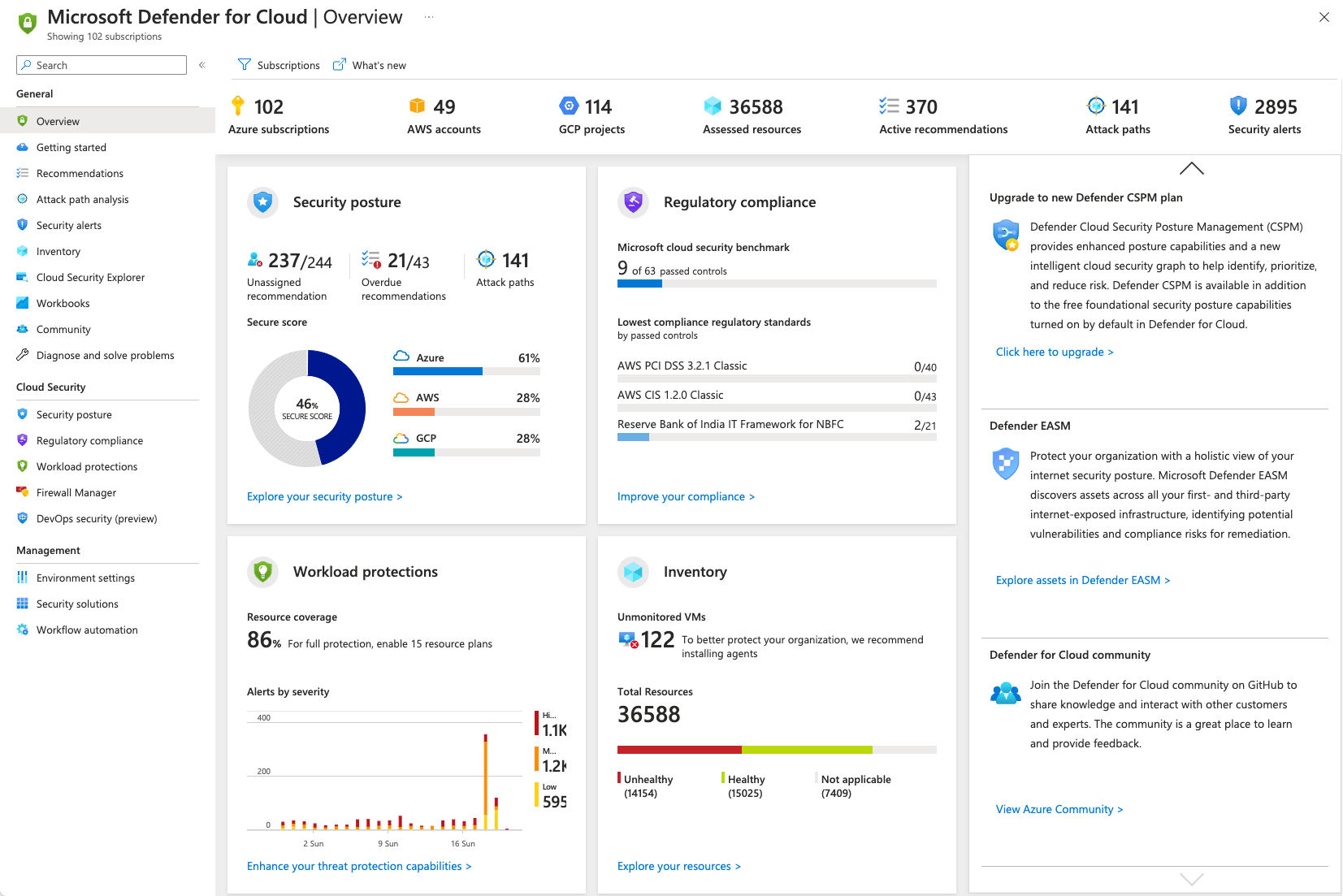
Microsoft Defender for App Service is a workload protection capability within Microsoft Defender for Cloud that provides advanced threat protection and security monitoring for applications hosted on Azure App Service.
It helps organizations:
Thi s is where as this solution continuously analyzes telemetry, application behavior, access patterns, and security signals to identify malicious activities and potential attack vectors.
Understand what is Azure App Service
If you are have just started reading from this blog, please go refer this blog, as it explains what is an Azure App Service and its impact in the market:
Core Security Challenges in App Service
Organizations commonly face the following risks: (have faced few of them ;))
Traditional perimeter security alone is no longer sufficient as modern applications require intelligent, cloud-native security monitoring.
Key Features of Microsoft Defender of Cloud
1. Threat Detection
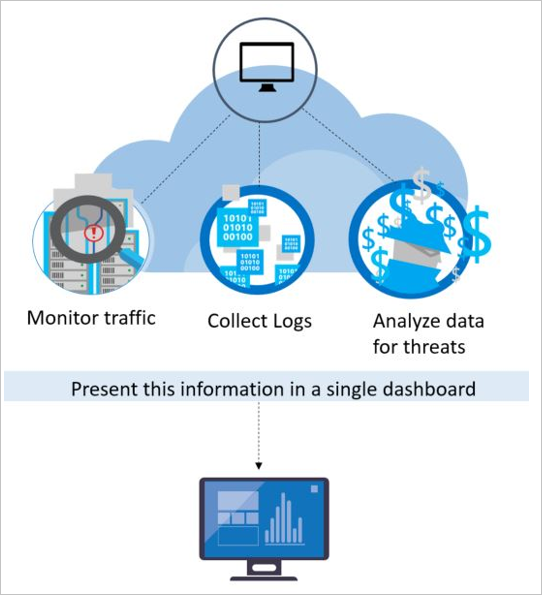
this Defender will continuously run monitiirng for incoming traffic and application activities to identify suspicous behavior,
such as remote code execution attempts, web shell deployments, SQL injection attacks, malicious requests, and unauthorized access attempts.
This enables security teams to detect and respond to threats before they impact business operations.
2. Vulnerability and security posture assessment
As this tool continuously evaluates App Service configurations and identifies security weaknesses, including insecure settings, missing HTTPS enforcement, weak TLS configurations, and other misconfigurations that could expose applications to cyber threats.
It then provides actionable recommendations to help organizations strengthen their security posture and align with industry best practices.
3. Security Recommendations
It also delivers intelligent security recommendations that guide administrators in implementing security controls such as enabling HTTPS-only traffic, configuring managed identities, integrating Web Application Firewalls (WAF), restricting unnecessary public access, and enabling comprehensive logging and monitoring.
These recommendations help organizations proactively reduce their attack surface and improve compliance.
4. Integration with Microsoft Security Ecosystem
In addition, Microsoft Defender integrates seamlessly with other Microsoft security services, including the following
- Microsoft Sentinel,
- Microsoft Entra ID (https://techaiquantum.com/2025/08/10/from-chaos-to-control-my-real-world-journey-with-microsoft-entra-id/)
- Azure Monitor,
- Application Insights
- Azure Key Vault (https://techaiquantum.com/2025/12/15/azure-key-vault-a-core-resource-for-securing-secrets-keys-and-certificates/)
As this integration provides centralized visibility across the security ecosystem, enabling security operations teams to investigate incidents, correlate alerts, automate responses, and maintain a comprehensive view of application security across the organization.
Together, these capabilities make Microsoft Defender for App Service a powerful cloud-native security solution for protecting modern web applications and APIs hosted on Azure.
Common Threats Detected
Microsoft Defender for App Service can detect activities such as:
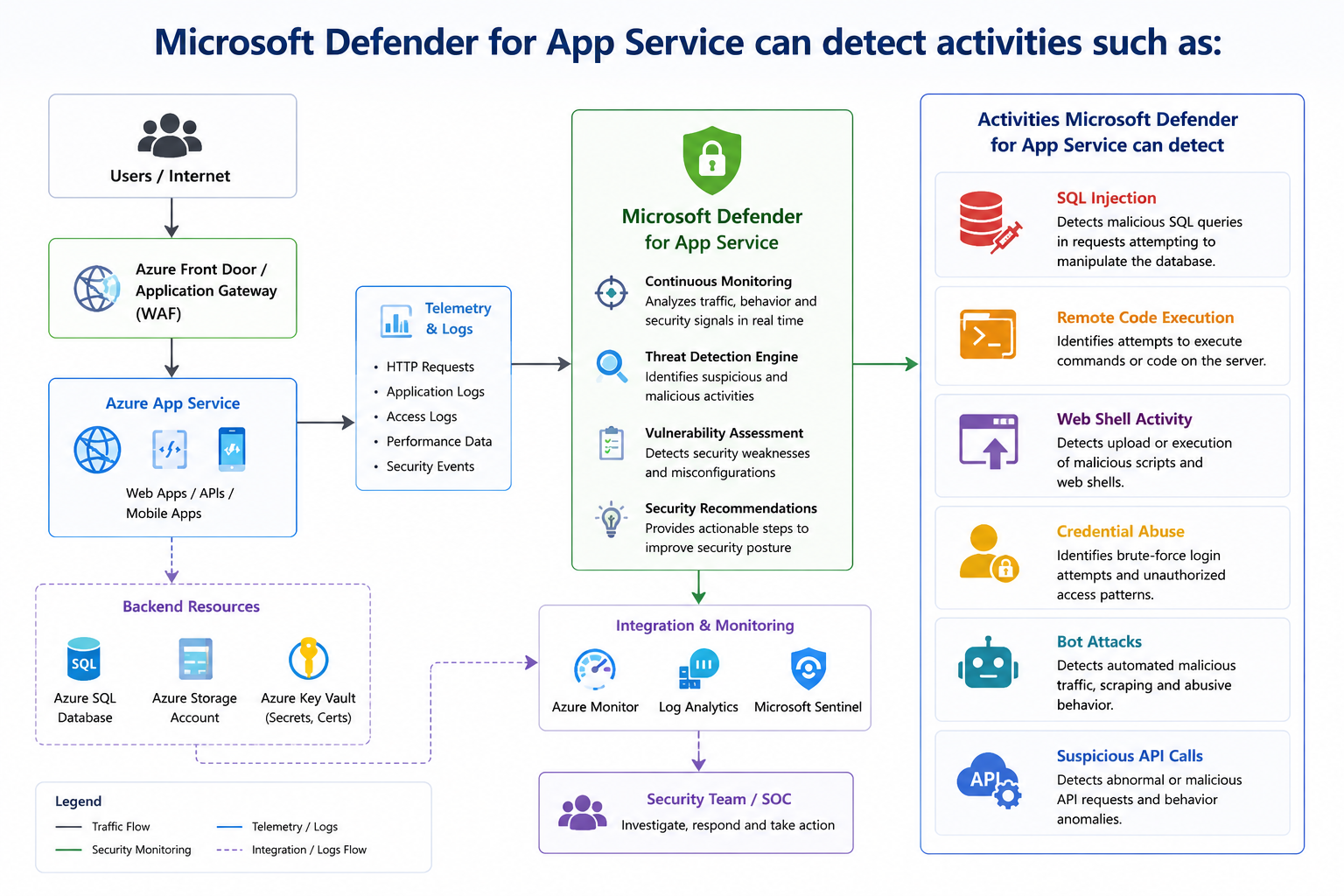
These detections help us make/respond quickly before damage occurs.
Best Practices for Securing Azure App Service
Reach out to understand how these would really cerate a secured impact to your environment /organization
Microsoft Defender for App Service – Reference Architecture
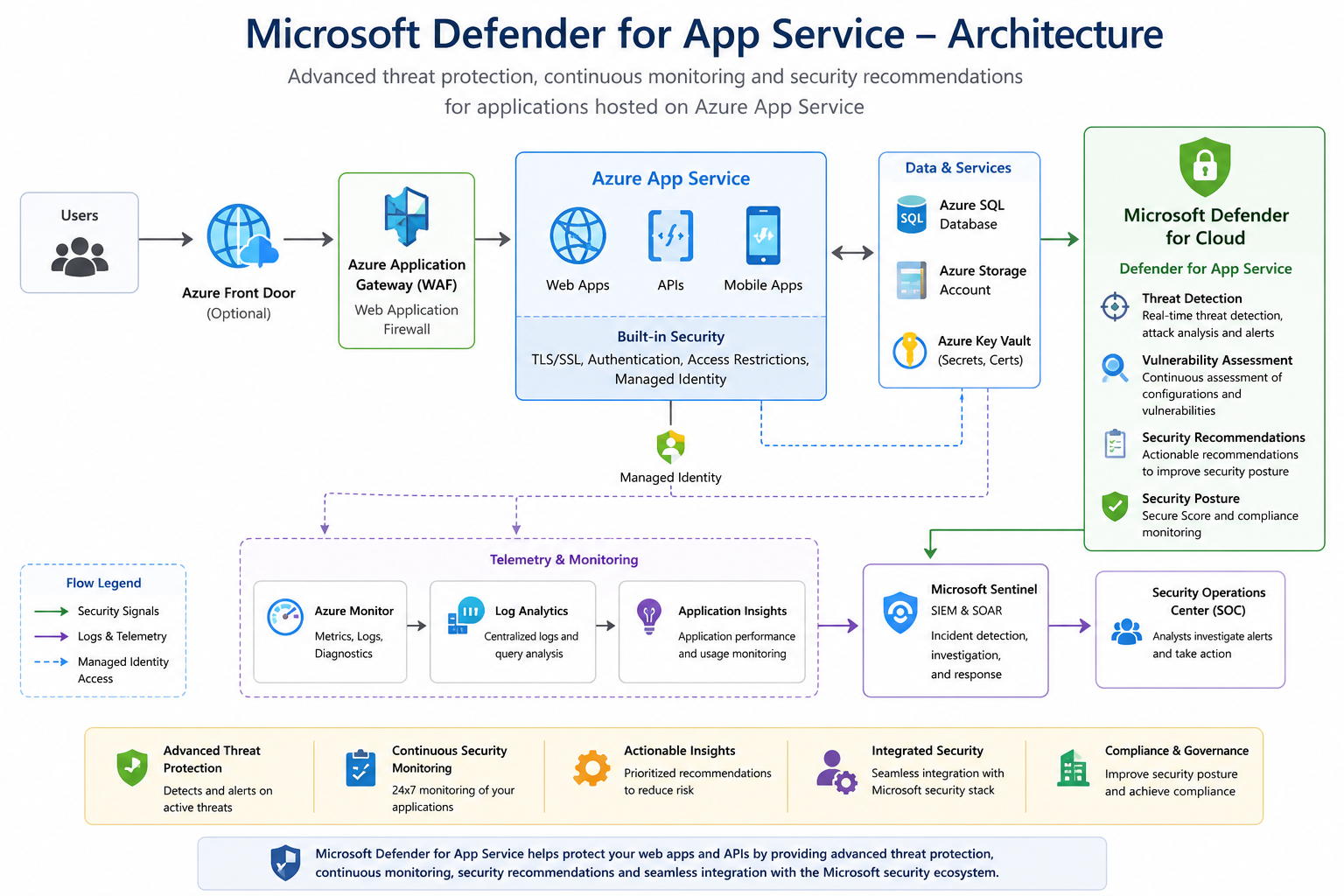
In this architecture, user traffic first enters through Azure Front Door or Azure Application Gateway with Web Application Firewall (WAF) enabled, providing protection against common web-based attacks.
The requests are then routed to Azure App Service, where web applications and APIs are hosted. The App Service securely accesses backend services such as Azure SQL Database, Azure Storage Accounts, and Azure Key Vault using Managed Identity, eliminating the need to store credentials within the application.
Microsoft Defender for App Service, enabled through Microsoft Defender for Cloud, continuously monitors the application environment, analyzes traffic patterns, detects suspicious activities, identifies vulnerabilities, and generates security recommendations. Security alerts and telemetry are sent to Azure Monitor and Log Analytics, where they can be further integrated with Microsoft Sentinel for centralized security monitoring, incident investigation, automated response, and Security Operations Center (SOC) visibility.
This architecture provides a layered security approach that combines preventive controls, continuous monitoring, threat detection, and centralized security management for enterprise-grade Azure App Service deployments.
The Value it hits when I used Defender for Cloud on App
On one Azure project, we hosted a customer-facing app on Azure App Service and turned on Microsoft Defender for App Service as part of our security stack. Soon after deployment, Defender started alerting on suspicious requests hitting one of our API endpoints as it flagged them as likely SQL injection attempts.
We used the alert details plus logs from Azure Monitor and Application Insights to investigate. Within a short time we confirmed the malicious activity and verified that our security controls had blocked the attack. Afterward, we tightened things further by putting an Azure Application Gateway with WAF in front of the app and strengthening access controls.
That incident really drove home how useful Microsoft Defender for App Service can be: it gives real-time threat detection, clear visibility into attempted attacks, and practical recommendations to harden the security posture of apps running on Azure.
I m just trying to explain a situation where Defender for Cloud was useful for us to use it
Cost Considerations
Microsoft Defender for App Service is licensed as part of Microsoft Defender for Cloud.
As Organizations should evaluate:
- Number of protected App Services
- Monitoring requirements
- Compliance obligations
- Security operations maturity
While additional costs apply, the security value and risk reduction often justify the investment.
Conclusion
As cyber threats continue to evolve, organizations must move beyond traditional security approaches and adopt intelligent cloud-native protection mechanisms.
Microsoft Defender for App Service provides:
- Advanced threat detection
- Continuous monitoring
- Actionable recommendations
- Deep Azure integration
for applications hosted on Azure App Service.
As I believe, for enterprises adopting cloud-first strategies, integrating Microsoft Defender into the Azure security architecture is no longer optional as it is a critical component of modern cloud security.
References:
- https://learn.microsoft.com/en-us/azure/defender-for-cloud/defender-for-cloud-introduction
- https://learn.microsoft.com/en-us/security/
- https://learn.microsoft.com/en-us/azure/defender-for-cloud/defender-for-app-service-introduction
- https://learn.microsoft.com/en-us/azure/defender-for-cloud/defender-for-app-service-introduction#what-threats-can-defender-for-app-service-detect
- https://learn.microsoft.com/en-us/azure/defender-for-cloud/tutorial-enable-app-service-plan
