


Azure Key Vault: Securing Secrets, Keys, and Certificates in the Cloud
In modern cloud environments, security is no longer optional, it is a foundational requirement. Applications rely on secrets such as passwords, API keys, connection strings, and certificates, and managing these securely is one of the most critical challenges in cloud architecture. Azure Key Vault is Microsoft Azure’s native service designed to securely store and manage sensitive information while maintaining strict access control and auditability.
Hey folks, if you're building apps in the cloud, you know how messy it gets handling secrets like API keys, passwords, or certs. Hardcoding them? Total nightmare waiting to happen. Enter Azure Key Vault – Microsoft's secret-keeper that makes life way easier and safer. I've used it on a few projects, and it's a game-changer for keeping your Azure setups locked down.
What is Azure Key Vault?
At its core, Key Vault is a cloud service for safely storing and managing sensitive stuff: secrets (think connection strings or passwords), cryptographic keys, and certificates. Instead of scattering them across config files or Git repos (RIP to anyone who's accidentally committed an AWS key), you centralize everything in one encrypted vault.
It runs on hardware security modules (HSMs) for top-tier protection, and Azure handles the heavy lifting like key rotation and access logging. No more "oops, my prod password is in Slack" moments.
The Big Security Wins
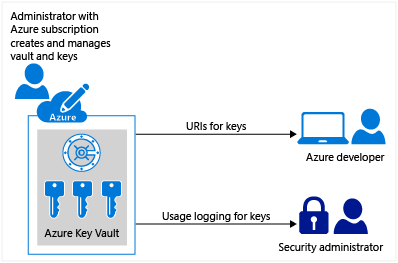
- Centralized Control: One place for all secrets means easier auditing and policy enforcement. Centralizing application secrets in Azure Key Vault enables secure control and distribution of sensitive information while significantly reducing the risk of accidental exposure. Developers no longer need to embed secrets, such as database connection strings, in application code. Instead, applications securely retrieve required secrets from Key Vault using URIs, including specific secret versions, without the need for custom security code.
- Access Policies: After creating Azure Key Vaults, it’s important to monitor access to keys and secrets by enabling logging. Azure Key Vault logs can be archived to a storage account, streamed to an event hub. You retain full control over these logs, including securing access and deleting them when they are no longer required.Use RBAC or access policies to say who (or what service principal) gets in. Integrate with Azure AD for MFA and just-in-time access.
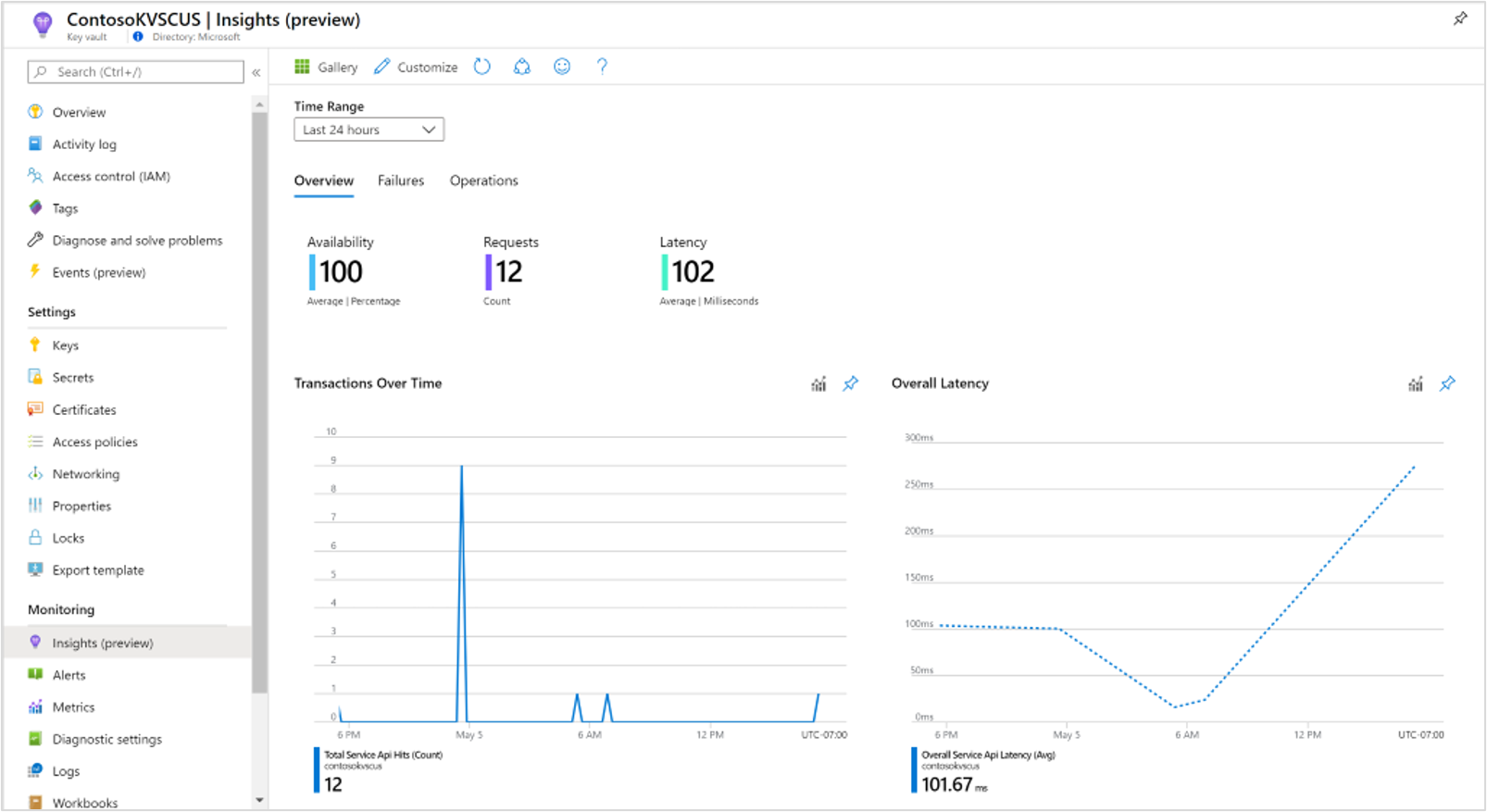
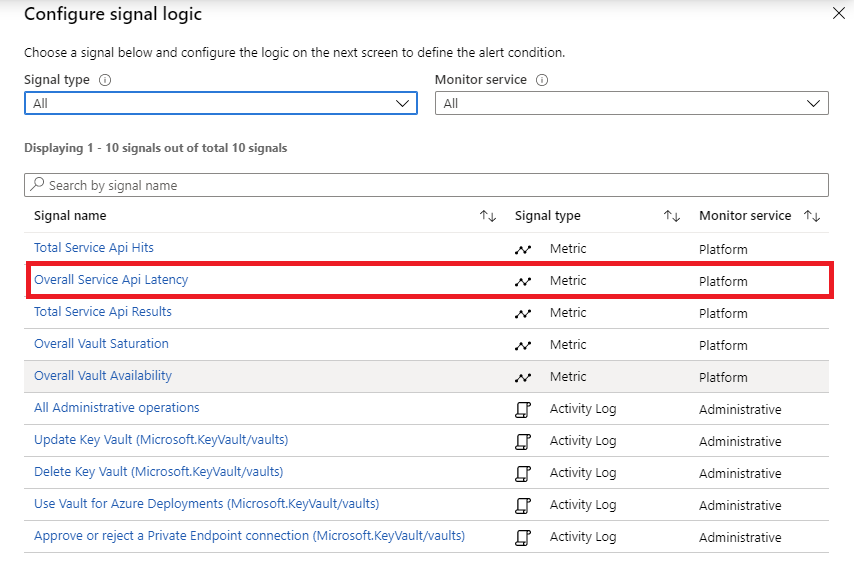
- Monitor: these access logs or events can be sent to Azure Monitor to make our own conditions, alerts or notifications and make necessary actions in regard
- No Vendor Lock-in Vibes: Works seamlessly with Azure services like App Service, Functions, AKS, and even non-Azure stuff via SDKs.
- Manage/Administrate Resrources: Azure Key Vault simplifies secure management of sensitive data by ensuring strong security, lifecycle management, and high availability. It removes the need for in-house HSM expertise, automatically scales to handle demand spikes, and replicates data within and across regions for high availability without manual failover. Key Vault also supports standard Azure management tools and automates certificate enrollment and renewal. Additionally, it enables segregation of application secrets by allowing per-application vaults with tightly controlled access and permitted operations.
- Auto-Rotation: Set it to rotate keys or certs automatically – set it and forget it.
What is Zero Trust?
Zero Trust is a security strategy. It isn't a product or a service, but an approach in designing and implementing the following set of security principles. the basic principles are as follows:
Ref: https://learn.microsoft.com/en-us/security/zero-trust/zero-trust-overview
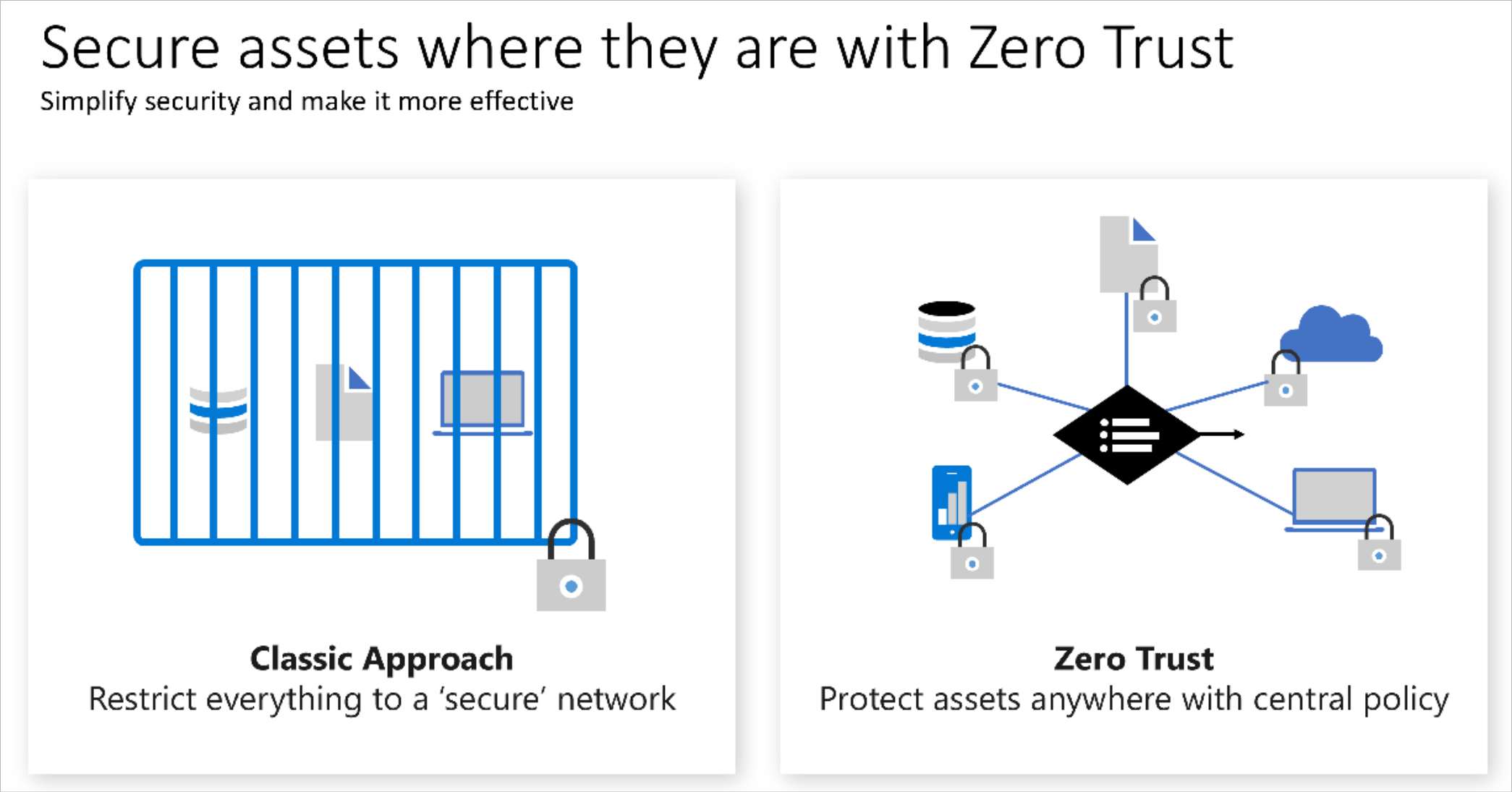
These principles are the core of Zero Trust. Instead of believing everything behind the corporate firewall is safe, the Zero Trust model assumes breach and verifies each request as though it originated from an uncontrolled network. Regardless of where the request originates or what resource it accesses, the Zero Trust model teaches us to "never trust, always verify."
Zero Trust is designed to adapt to the complexities of the modern environment that embraces the mobile workforce. Zero Trust protects user accounts, devices, applications, and data wherever they're located.
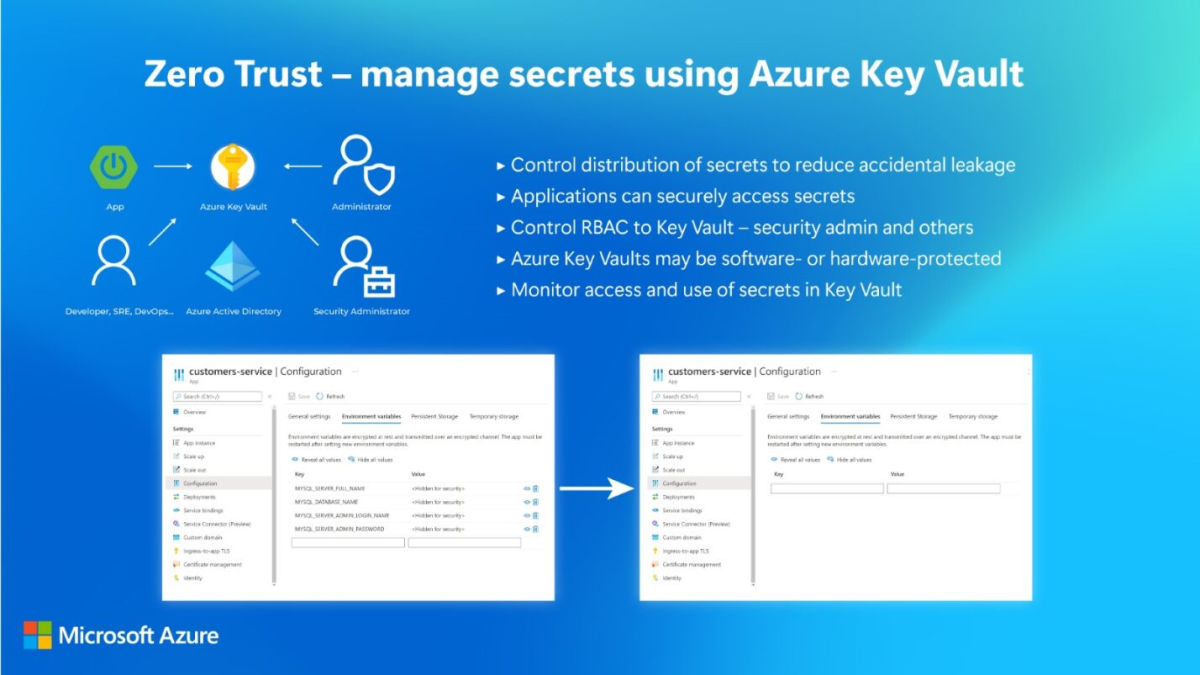
A Zero Trust approach should extend throughout the entire organization and serve as an integrated security philosophy and end-to-end strategy.
Will discuss about this more in the upcoming Blogs!!!
Key Management in Azure
In Azure, encryption keys are managed either by Microsoft or by the customer.
Platform-managed keys (PMKs) are fully generated, stored, and controlled by Azure, with no customer interaction, and are used by default for services like encryption at rest.
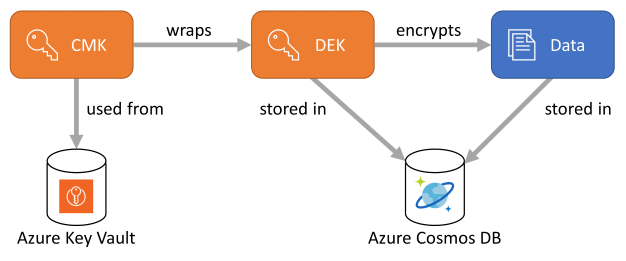
Customer-managed keys (CMKs) are controlled by customers and can be created, stored, imported (BYOK), rotated, or deleted using services such as Azure Key Vault or HSMs.
A special type of CMK, called a Key Encryption Key (KEK), is used to protect other encryption keys. CMKs can be stored on-premises or, more commonly, in cloud-based key management services.
Azure Key Vault Offerings/Tiers
Azure offers a range of cloud-based key management services designed to address varying security, compliance, and operational requirements.
Azure Key Vault (Standard) uses software-protected keys with FIPS 140-2 Level 1 validation, making it suitable for managing secrets, certificates, and general encryption needs.
Azure Key Vault (Premium) enhances this by providing hardware-backed key protection through HSMs with FIPS 140-3 Level 3 validation and PCI compliance, fully managed by Microsoft.
For organizations requiring stronger security controls and key sovereignty, Azure Key Vault Managed HSM delivers a single-tenant, FIPS 140-2 Level 3–validated HSM with confidential keys, where customers retain full control while Microsoft operates the underlying infrastructure without access to the keys.
Azure Dedicated HSM also offers a single-tenant, FIPS Level 3–validated environment, granting complete administrative control for advanced cryptographic and legacy scenarios, though it does not integrate with Azure PaaS services.
For payment and financial workloads, Azure Payment HSM provides a PCI-compliant, single-tenant HSM purpose-built for secure payment processing, ensuring exclusive customer control and zero Microsoft access to sensitive data.
Technical Overview on Stored Values
Azure Key Vault enables Microsoft Azure applications and users to store and use several types of secret/key data:
- keys,
(Refer this link: https://learn.microsoft.com/en-us/azure/key-vault/keys/about-keys) - Secrets,
(Refer this link: https://learn.microsoft.com/en-us/azure/key-vault/secrets/about-secrets) - Certificates
(Refer this link: https://learn.microsoft.com/en-us/azure/key-vault/certificates/about-certificates)
Keys, secrets, and certificates are collectively referred to as "Objects".
In Azure Key Vault, objects are uniquely identified by a case-insensitive object identifier that is globally unique across all locations. The identifier includes the Key Vault name, object type, user-defined object name, and an optional version. Identifiers without a version are called base identifiers. These identifiers are valid URLs and should always be treated as case-insensitive when compared.
Azure Key Vault supports JSON formatted requests and responses. Requests to the Azure Key Vault are directed to a valid Azure Key Vault URL using HTTPS with some URL parameters and JSON encoded request and response bodies.
Data types
Refer to the JOSE specifications for relevant data types for keys, encryption, and signing.
- Algorithm – a supported cryptographic algorithm used for key operations, such as RSA_OAEP_256.
- Ciphertext value – encrypted data represented as octets and encoded using Base64URL.
- Digest value – the output generated by a hash algorithm, encoded using Base64URL.
- Key type – a supported key format, such as RSA (Rivest–Shamir–Adleman).
- Plaintext value – unencrypted data represented as octets and encoded using Base64URL.
- Signature value – the result produced by a digital signature algorithm, encoded using Base64URL.
- Base64URL – a binary value encoded using the Base64URL format as defined in RFC 4648.
- Boolean – a logical value that can be either true or false.
- Identity – an identity issued by Microsoft Entra ID.
- IntDate – a JSON decimal value representing the number of seconds elapsed since 1970-01-01T00:00:00Z (UTC) to a specified UTC date and time, as defined in RFC 3339.
Versioning in Secrets
Azure Key Vault automatically versions objects each time a new instance is created. Every version has a unique identifier, with the newest version marked as the current one.
Objects can be retrieved either by specifying a particular version or by omitting the version to access the latest version, while operations on objects can target specific versions as needed.
Real World Scenarios
As usual blog, I m back with some real-world experience on Azure Key Vault from projects I've worked on and stuff I've seen devs share. No fluff – just practical examples of how it saves your butt in actual apps.
01. Securing Database Credentials for Enterprise Applications
In one of our enterprise Azure deployments, we migrated a legacy on-premises application to Azure App Service with an Azure SQL backend. Instead of storing database credentials in application configuration files, we integrated Azure Key Vault with Managed Identity.
The application retrieves the connection string securely at runtime from Key Vault, eliminating hard-coded secrets and significantly improving security posture. Credential rotation was done without application downtime.
Outcome of this Project was that;
- No secrets stored in code or config
- Improved compliance and audit readiness
- Simplified credential rotation
02. Storing SSL Certificate (Certificate Management) for Application Gateway
In a production web application hosted behind Azure Application Gateway, we used Azure Key Vault to store and manage SSL/TLS certificates.
The Application Gateway was integrated directly with Key Vault, enabling automated certificate updates without manual intervention or service downtime.
Outcome of this Project was that;
- Zero downtime certificate renewal
- Centralized certificate management
- Reduced operational overhead
03. Securing SAP / ERP Integrations
During an ERP integration project, multiple systems (SAP, middleware services, and Azure Data Factory) required secure API keys and credentials.
We centralized all integration secrets in Azure Key Vault and granted access using managed identities, ensuring secrets were never exposed in pipelines or configuration files.
Outcome of this Project was that;
Secure system-to-system integrations
Simplified secret management
Auditable access logs for compliance
04. Customer-Managed Keys for Data Encryption
this is the project which i love the most, as pe the regulations of a Counttry, and the policies which we uphold, we are forced to keep control of every small atribute. In a compliance-driven project, we implemented customer-managed keys (CMK) using Azure Key Vault to encrypt:
- Azure Managed Disks
- Azure Storage Accounts
- Azure SQL Databases
Keys were rotated periodically as per security policy, and access was restricted to authorized services only.
Outcome of this Project was that;
- Met regulatory and compliance requirements
- Full control over encryption keys
- Improved trust with stakeholders
05. Auditing and Monitoring for Compliance
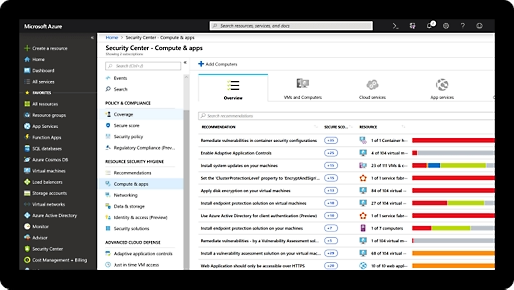
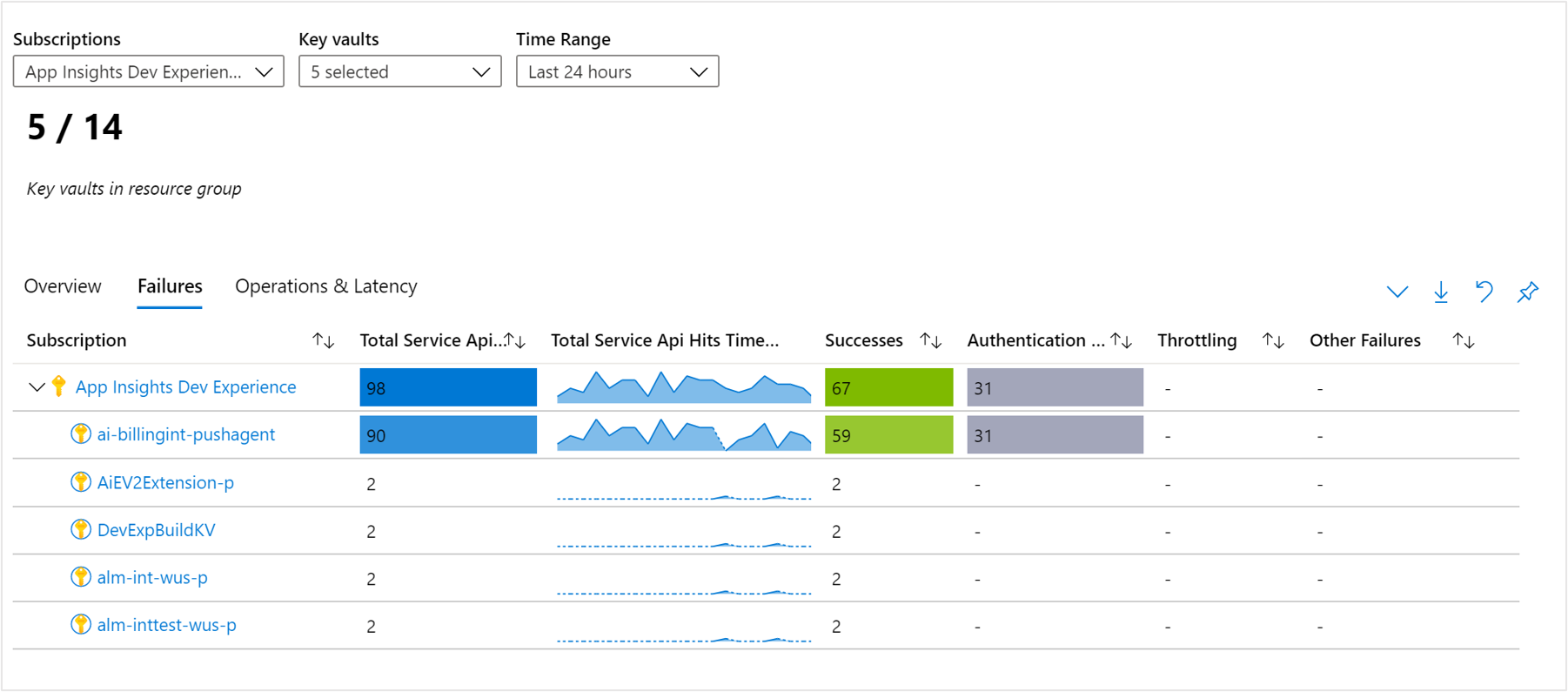
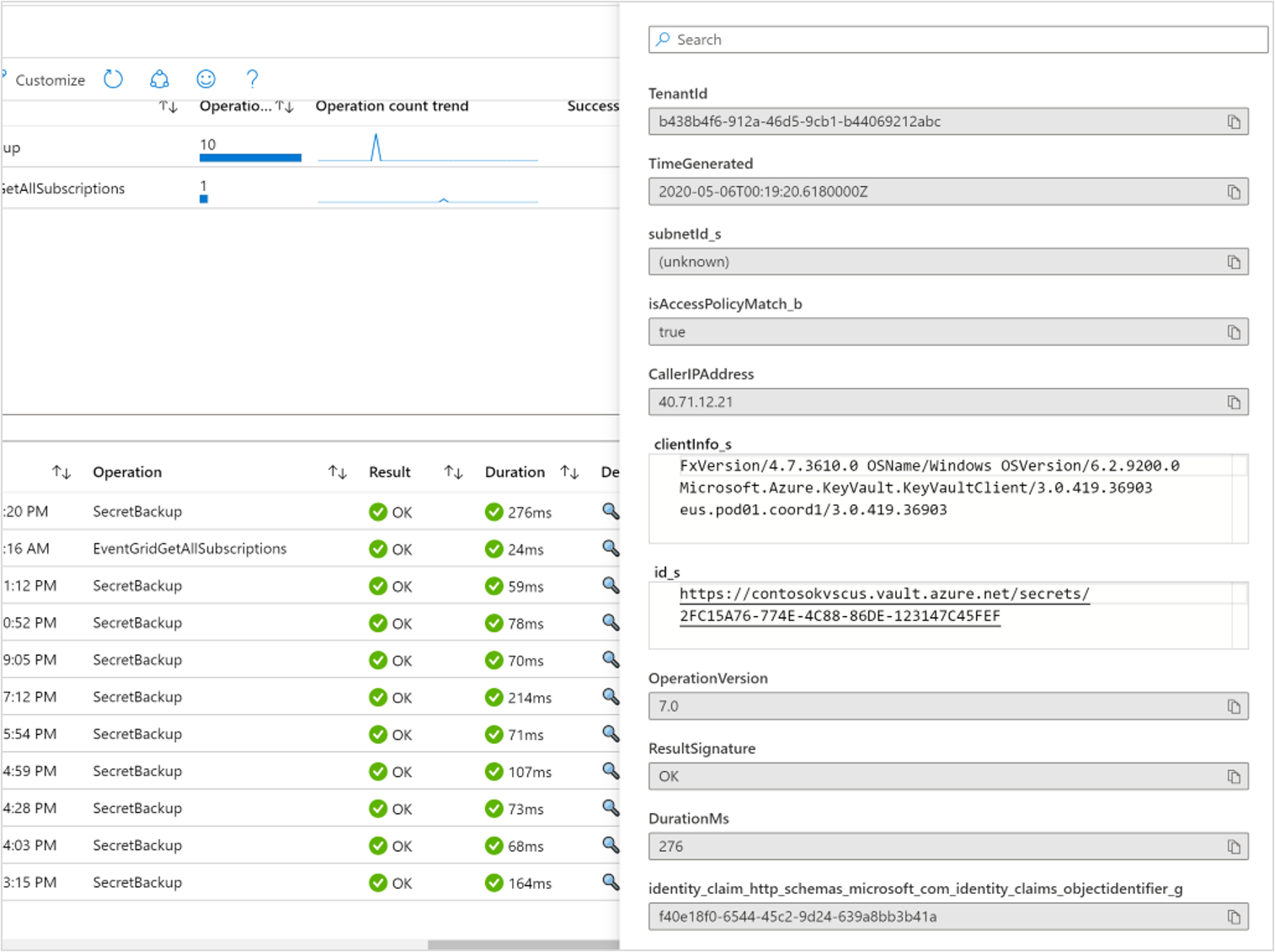
This is where we enabled diagnostic logging on Azure Key Vault and integrated it with Log Analytics and Microsoft Defender for Cloud.
This provided full visibility into the following:
- Secret access attempts
- Unauthorized access failures
- Operational usage patterns
Outcome of this Project was that;
- Real-time security monitoring
- Easier compliance reporting
- Faster incident response
06. Multi-Tenant SaaS with Separate Vaults
We built a multi-tenant app for clients, each needing their own certs and API keys. Made a Key Vault per tenant – strict RBAC so Client A's vault stays invisible to Client B.
We imported their SSL certs for API endpoints, set auto-renewal via partners. Compliance team loved it; different retention policies per vault meant easy GDPR/HIPAA tweaks without touching code. Cut breach risk big time during a pentest.
Outcome of this Project was that;
- Different Retention policies
- Different compliance was achieved
- Applications was widely used by everyone
Conclusion
Azure Key Vault is a core Azure security service that protects secrets, keys, and certificates through centralized management, strong access control, and seamless integration with Azure services, making it essential for secure and compliant cloud architectures.
This is one of the important/crucial resource that helps with the Well Architected Framework and Zero Trust
Disclaimer: The images used in this content are sourced from Microsoft pages and referenced from Microsoft Learn.
