

Introduction
The AI Gateway in Azure API Management is an advanced extension of the traditional API gateway capabilities, designed specifically to manage, secure, scale, monitor, and govern AI workloads and large language model (LLM) deployments effectively.
This feature is integrated fully into the Azure API Management environment and Microsoft Foundry, providing enterprise-grade governance and operational management for AI APIs, Model Context Protocol (MCP) servers, and related infrastructure backing intelligent applications.
Why Use an AI Gateway?
As I work with organizations on their AI journey, I see that AI adoption usually happens in stages.
As starting from defining requirements and evaluating the right models, to building AI apps and agents, and finally operationalizing and deploying everything into production. As this matures, especially in larger enterprises, the need for an AI gateway becomes very clear.
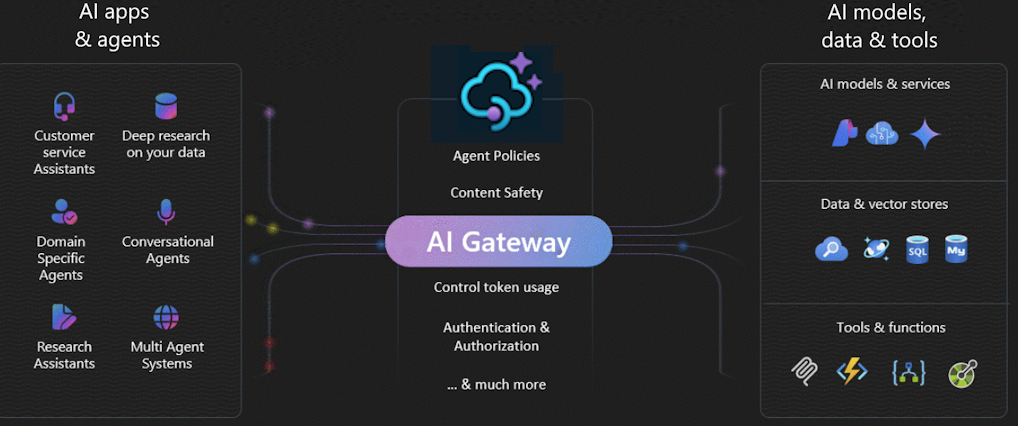
It helps me ensure secure authentication and authorization, balance traffic across multiple AI endpoints, monitor and log all AI interactions, manage token usage and quotas, and also provide a self-service experience for development teams.
The AI gateway lets you quickly onboard and manage LLM endpoints from Microsoft Foundry, OpenAI-compatible services, or other providers. It helps govern chat completions, APIs, and agent integrations, while exposing existing REST APIs.
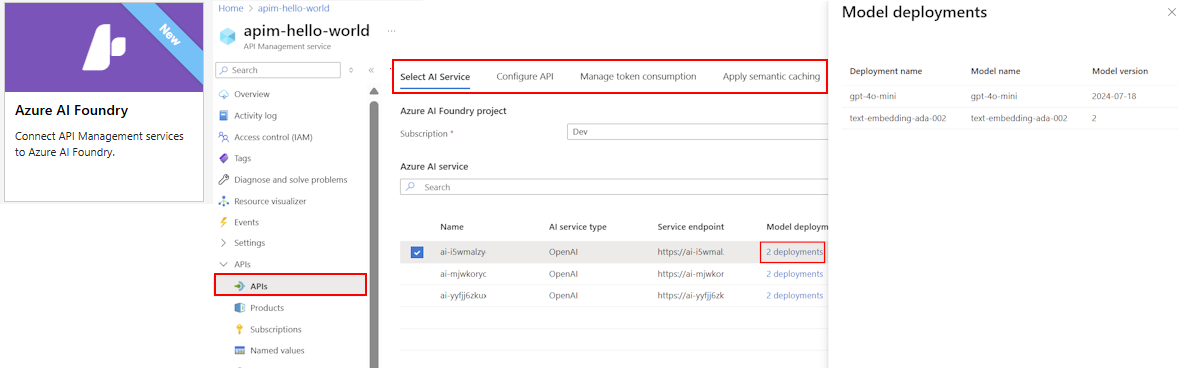
Using streamlined wizards, you can import models, set up authentication with managed identities, and preconfigure policies for scalability, security, and observability—without manual setup.
Core Architecture and Role
The AI Gateway acts as a consistent unified REST API front door for a diverse set of AI model deployments, including Azure OpenAI services, Azure AI Foundry models, third-party OpenAI-compatible endpoints, and self-hosted AI models.
It abstracts the complexity of these heterogeneous AI backends by providing a centralized API layer that handles routing, authentication, schema import, transformation, and policy enforcement.

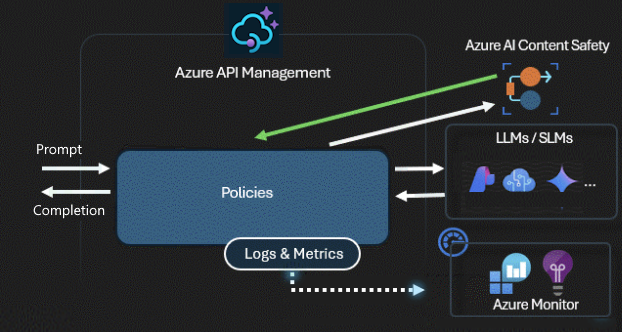
This is an AI generated diagram
This gateway leverages Azure API Management's existing features such as rate limiting, quotas, request/response transformation, and caching but enhances them with AI-specific controls and telemetry. please find the other in detail as follow:
1. Traffic Mediation and Control
From a technical standpoint, the AI Gateway supports rapid onboarding of AI models through streamlined wizards that import model schemas and configure secure authentication via managed identities. It enables traffic management capabilities tailored to AI scenarios, such as governance over chat completions, fine-grained usage limits on tokens or request volumes, and real-time request routing.
Advanced policies, including circuit breakers, throttling, A/B testing for different model versions, and response caching, are integral to ensuring high availability and cost optimization.
The gateway supports exposing existing REST APIs as MCP servers or proxying calls transparently to legacy AI services, bolstering seamless integration for applications with diverse AI consumption patterns.
2. Security and Governance
Security is enforced to the APIs with the follownng;
- OAuth 2.0,
- API keys,
- Managed identities,
- Role-Based Access Control (RBAC),
- Azure Active Directory (Entra AD) integration (Managed Identities),
ensuring that each AI request is authenticated and authorized with enterprise-grade controls.
Usage governance features include long-term token quotas and short-term rate limits to control costs and prevent abuse.
This governance extends to AI agents as well, allowing centralized inventory, monitoring, and anomaly detection with the ability to block or throttle agents that pose risks.
API Management delivers robust monitoring and analytics to help track token usage, control costs, maintain compliance, and troubleshoot AI API issues.
It enables logging prompts and completions to Azure Monitor, tracking token metrics in Application Insights, using built-in dashboards, applying custom policy expressions, and enforcing token quotas.
You can also emit detailed token metrics with the llm-emit-token-metric policy, including custom dimensions like client IP, API ID, and user ID for advanced filtering in Azure Monitor.
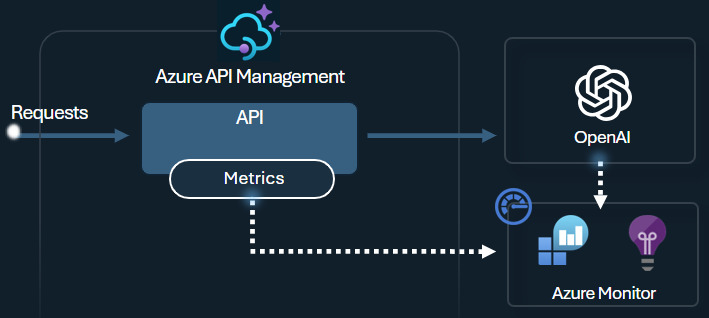
Additionally, enable logging for your LLM APIs in Azure API Management to monitor token usage, prompts, and completions for billing and auditing purposes.
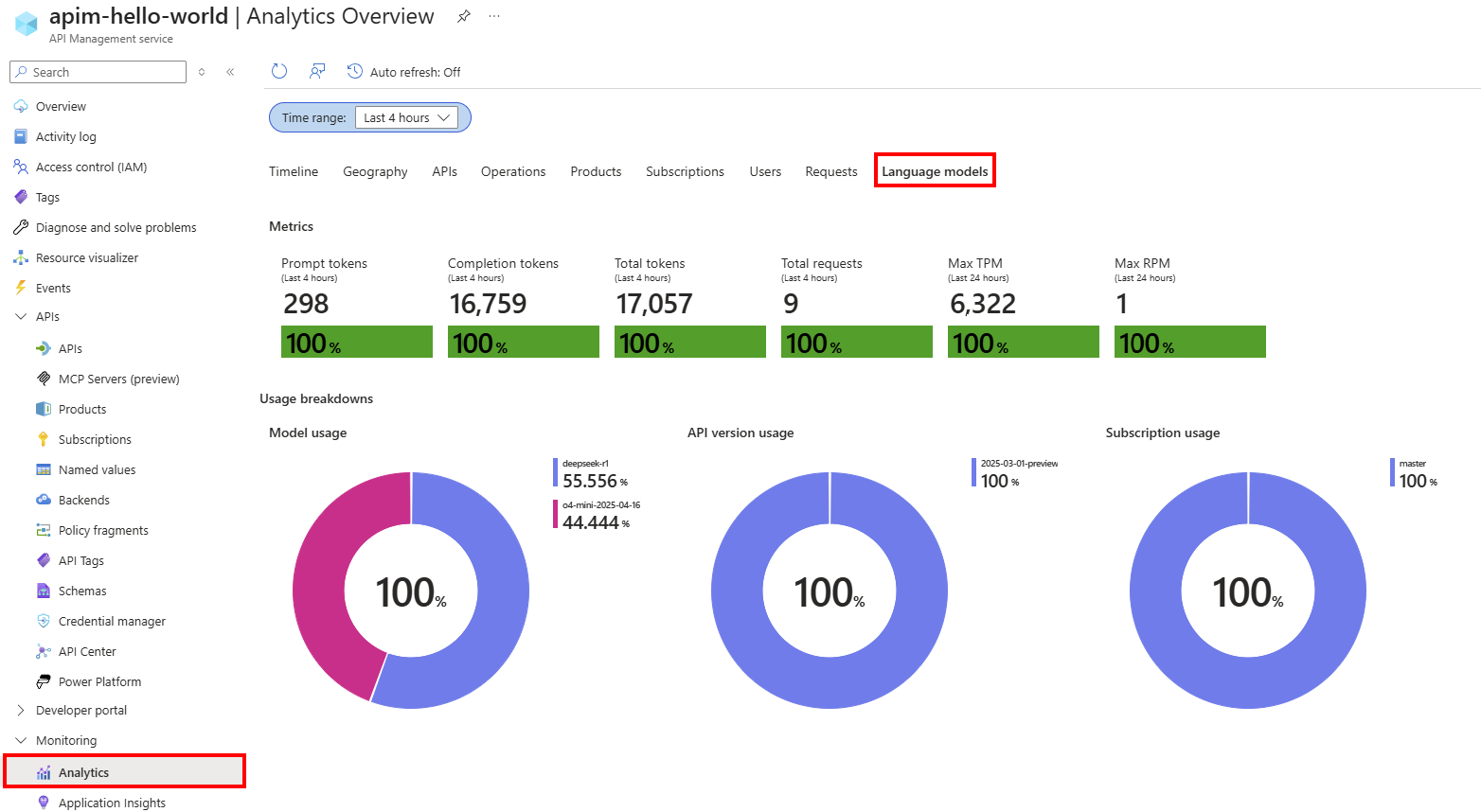
Once logging is activated, you can analyze the data in Application Insights and use the built-in API Management dashboard to visualize token consumption patterns across your AI APIs
3. Developer and Operational Experience
The AI Gateway integrates tightly with Azure API Center, where organizational catalogs of AI APIs and MCP servers are maintained, supporting self-service developer portals to speed up AI application development.
The policy toolkit provides extensive customization of API behaviors for specific AI workflows, while telemetry integration with Application Insights ensures robust monitoring and diagnostics out-of-the-box.
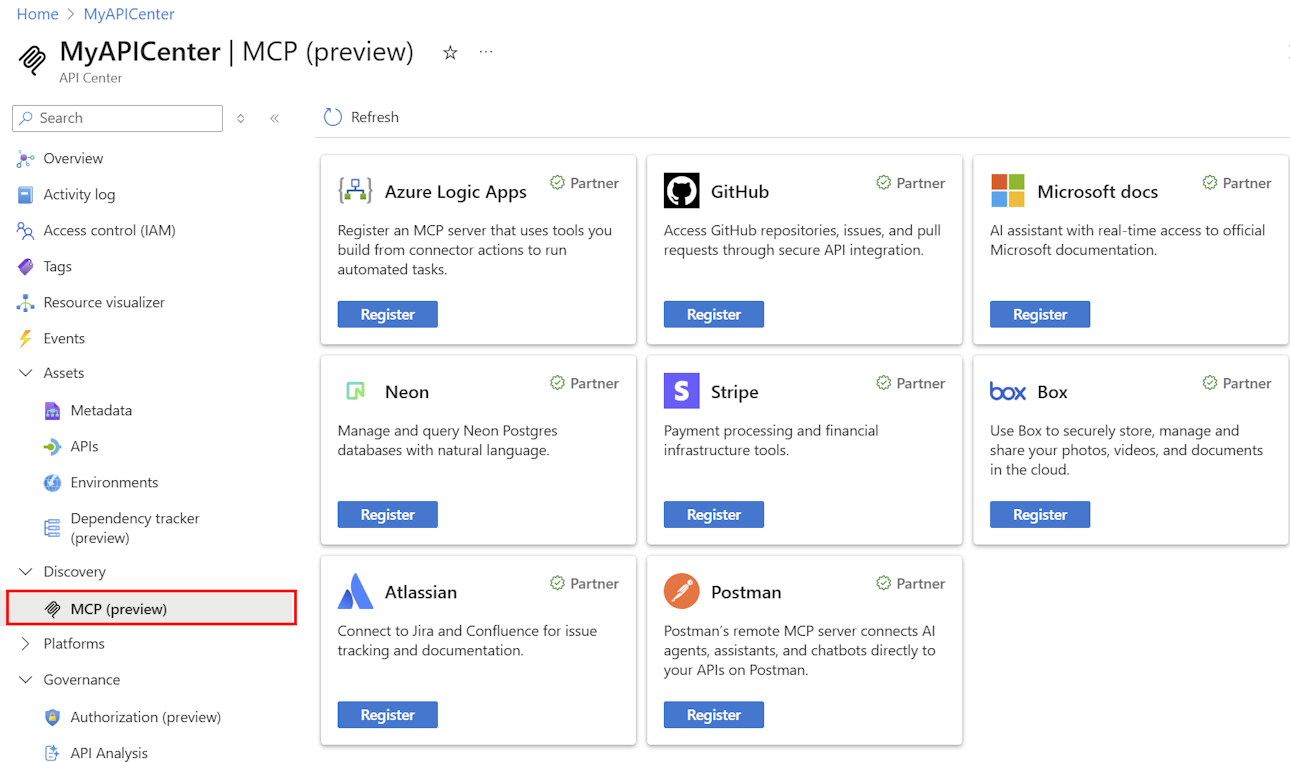
Administrators and architects can create or associate AI Gateway instances within the Foundry resource, unifying management and telemetry with the AI application lifecycle without leaving the development environment.
This streamlining reduces operational complexity while maintaining full continuity with Azure API Management's enterprise capabilities.
4. Platform Integration and Ecosystem
The AI Gateway benefits from Azure Front Door for global load balancing, DDoS protection, and intelligent routing, which ensures low-latency access across regions. It supports models hosted on multiple clouds or on-premises, promoting flexibility and hybrid AI architectures.
The introduction of the AI Gateway marks an evolution in API management by embedding AI-specific traffic and governance controls inside familiar API gateway paradigms.
5. Scalability and performance
From my experience working with generative AI services, one of the most important resources to manage is TOKENS.
Platforms like Microsoft Foundry and others AI Sources allocate quotas as tokens-per-minute (TPM), and these tokens need to be distribute across different consumers; applications, developer teams, or departments.
When I’m dealing with a single application connecting to an AI backend, it’s easy to control token usage by setting a TPM limit directly on the model deployment.
But as the application landscape grows, and multiple apps start calling one or more AI endpoints, whether pay-as-you-go or Provisioned Throughput Units (PTU), the challenge increases.
Therefore, I need to ensure that one app doesn’t consume the entire TPM quota and block other apps from accessing the AI backend services they rely on.
6. Token rate limiting and quotas
You can configure a token limit policy on your LLM APIs to manage and enforce limits per API consumer based on the usage of AI service tokens. With this policy, you can set a TPM limit or a token quota over a specified period, such as hourly, daily, weekly, monthly, or yearly.
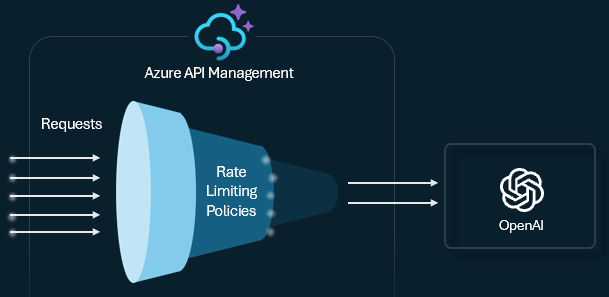
This policy gives me the flexibility to apply token-based limits on any counter key; whether it's a subscription key, an originating IP, or even a custom key defined through a policy expression.
It also allows Azure API Management to precalculate prompt tokens, helping me avoid sending unnecessary requests to the AI backend when the prompt already exceeds the allowed limit.
7. Semantic Caching
Semantic caching is a method that boosts LLM API performance by storing the outputs of previous prompts and reusing them when new prompts are semantically similar, based on vector proximity. This helps cut down the number of backend calls, speeds up responses for users, and can significantly reduce costs.
In Azure API Management, I can enable semantic caching using Azure Managed Redis or any RediSearch-compatible external cache. By leveraging the Embeddings API along with the llm-semantic-cache-store and llm-semantic-cache-lookup policies, I can store and retrieve completions for similar prompts.
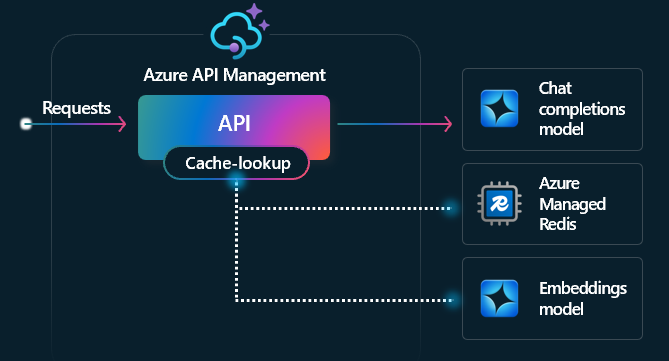
This allows results to be reused, reducing token usage and improving overall response performance.
8. Inbuilt Scaling features in API Management
API Management provides built-in scaling capabilities to ensure the gateway can efficiently manage high volumes of traffic to your AI APIs. You can scale by adding gateway units, either automatically or manually and by deploying regional gateways for multiregion workloads.
The specific scaling options vary depending on the chosen API Management tier.
For more insights, refer to my blog on modern API governance: https://techaiquantum.com/2025/11/17/modern-api-governance-with-azure-api-management/
9. Load Balancer
The backend load balancer offers multiple distribution methods;
- Round-robin
- Weighted
- Priority-based
- Session-aware
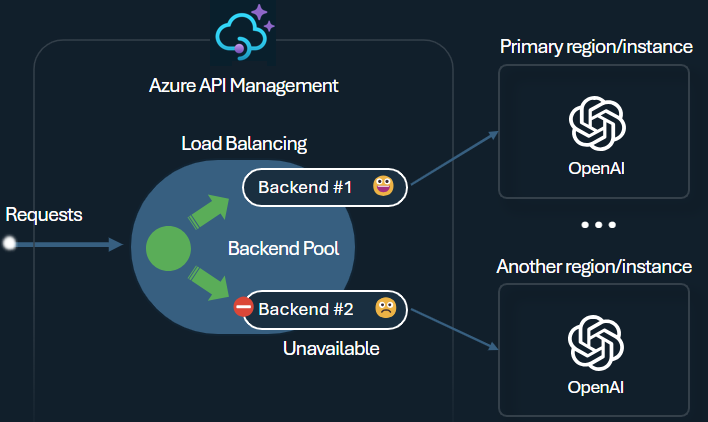
This lets you choose a strategy that fits your needs, such as prioritizing specific Microsoft Foundry PTU endpoints for optimal utilization.
Compare AI Gateway vs standard API Gateway for LLM workloads
When comparing AI Gateway versus a standard API Gateway for large language model (LLM) workloads, there are key technical distinctions driven by the specialized requirements of managing AI services versus traditional APIs.
Note: This Comparison was referred to many Microsoft and other related websites to be more precise with the points
In essence, the AI Gateway represents an evolution of the standard API Gateway concept, optimized and extended to meet the unique operational, security, and traffic patterns of LLM and AI model workloads.
It provides critical AI workload-aware governance, telemetry, and transformation capabilities that are not available in typical API gateways, making it essential for enterprises deploying complex, large-scale AI services reliably and securely.
This specialization enables organizations to effectively manage token consumption costs, secure AI model access, monitor AI-specific usage patterns, and deliver high availability and performance tuned to AI API semantics versus generic HTTP API management
Refer to Link: https://learn.microsoft.com/en-us/azure/api-management/genai-gateway-capabilities
Compatible LLM APIs with APIM
Through Azure API Management (APIM), you can use various LLM (Large Language Model) APIs by exposing them as managed APIs. Some of the main ones include:
- OpenAI-compatible APIs
ChatGPT, GPT-4, GPT-3.5 endpoints
Text completions, embeddings, and chat completions
- Microsoft Foundry AI models
Models deployed within Microsoft’s Fabric ecosystem.
Supports both chat-based and completion-based APIs
- Amazon Bedrock models (via passthrough): (I referred this through a video)
Foundation models from providers like Anthropic, AI21, Cohere
Can be proxied through APIM
- Custom or private LLM endpoints
Your own hosted LLM models (on Azure VMs, AKS, or other cloud services)
Can be exposed as REST APIs and managed via APIM
- Agent-to-agent (A2A) APIs (preview)
You can integrate between different AI agents and/or services

This is an AI generated Image
In Summary
In summary, as a Cloud Solution Architect or Tech Lead, the AI Gateway in Azure API Management represents a technical enabler to:
- Abstract, manage, and secure heterogeneous AI model APIs and MCP servers under a unified gateway layer.
- Apply AI-centered traffic management policies including token quota control, adaptive throttling, and response caching.
- Provide centralized logging, monitoring, and telemetry integrated seamlessly with Application Insights.
- Simplify the developer experience with organizational catalogs, self-service portals, and streamlined API onboarding.
- Integrate with Azure AI Foundry, Azure OpenAI, and third-party AI model providers, supporting hybrid and multi-cloud AI deployments.
- Maintain enterprise governance, security, and compliance through Azure AD integration, RBAC, and token management capabilities.
This makes the AI Gateway a critical component in architecting scalable, secure, and governed AI solutions on Azure, enabling teams to confidently deliver intelligent capabilities while managing operational complexity and cost.
Disclaimer
Disclaimer:
All images used in this blog are sourced from Microsoft Learn and are referenced from Microsoft’s official documentation
. They are used here for educational and illustrative purposes only. All rights and ownership of the original content belong to Microsoft.
